


headline 和 section 是 Org-mode 语法中最大的两个元素。headline 并不仅仅是一个 <hN> 标签,它还包含标题后面的内容(即 section),直到遇到另一个同级标题。在 HTML 中的 <section> 标签基本上能对应于 Org-mode 的 headline 加上它的 section 内容。
在 ox-html 中,section 的导出由 org-html-section 完成:
(defun org-html-section (section contents info)
  "Transcode a SECTION element from Org to HTML.
CONTENTS holds the contents of the section.  INFO is a plist
holding contextual information."
  (let ((parent (org-element-lineage section 'headline)))
    ;; Before first headline: no container, just return CONTENTS.
    (if (not parent) contents
      ;; Get div's class and id references.
      (let* ((class-num (+ (org-export-get-relative-level parent info)
			   (1- (plist-get info :html-toplevel-hlevel))))
	     (section-number
	      (and (org-export-numbered-headline-p parent info)
		   (mapconcat
		    #'number-to-string
		    (org-export-get-headline-number parent info) "-"))))
        ;; Build return value.
	(format "<div class=\"outline-text-%d\" id=\"text-%s\">\n%s</div>\n"
		class-num
		(or (org-element-property :CUSTOM_ID parent)
		    section-number
		    (org-export-get-reference parent info))
		(or contents ""))))))
我们可以注意到 org-html-section 使用 org-element-lineage 来找到 section 的列祖列宗,如果没有找到则说明它的前面没有 headline,这在 Org-mode 中也叫做 zeroth section。对于普通的 section,org-html-section 为它生成了一个 div wrapper,并添加了必要的类和 id。
当然,ox-w3ctr 主要受到了 W3CTR 和 ReSpec 的影响,部分 W3C 标准文档中的 <section> 格式大致如下:
<section id="introduction">
  <div class="header-wrapper">
    <h2 id="x1-introduction"><bdi class="secno">1. </bdi>Introduction</h2>
    <a class="self-link" href="#introduction" aria-label="Permalink for Section 1."></a>
  </div>
  <p>
    The <abbr title="Linked Web Storage">LWS</abbr> specifications aim
    to enable the development of web applications where data storage,
    entity authentication, access control, and application provider are
    all loosely coupled, as compared to the web of today where these are
    typically all tightly coupled, so changing one requires changing
    all, sometimes at a cost of all past data.
  </p>
  <p>
    This document lists user stories and use-cases for
    the <abbr title="Linked Web Storage">LWS</abbr> specifications, as
    well as requirements identified as necessary to satisfy these use
    cases.
  </p>
</section>
可见在 <section> 中,内容部分并没有什么多余的 wrapper,类或者 id,因此我也对 section 的导出做了简化:
(defvar t--zeroth-section-output nil
  "Internal variable storing zeroth section's HTML output.

This is used to override the default ox-html behavior where TOC comes
first, allowing zeroth section's content to appear before the TOC while
the TOC remains near the beginning of the document.")

;; FIXME: consider consider malformed headline(e.g., ** before first *)
(defun t-section (section contents _info)
  "Transcode a SECTION element from Org to HTML.
CONTENTS holds the contents of the section.  INFO is a plist
holding contextual information."
  (declare (ftype (function (t t t) string))
           (important-return-value t))
  ;; normal section
  (if (org-element-lineage section 'headline) contents
    (prog1 nil (setq t--zeroth-section-output contents))))
此处的 org-w3ctr--zeroth-section-output 存储了 zeroth section 的导出结果。如果按照 ox-html 的做法,zeroth section 将按照正常的文本顺序位于目录(Table of Contents, TOC)之后,我认为这一部分位于 TOC 之前更好,可以作为文档的引言部分。org-w3ctr--zeroth-section-output 将在 org-w3ctr-template 被插入导出结果。不过本文没有介绍 template 的导出,org-w3ctr--zeroth-section-output 的使用应该在下一篇。
在 ox-html 中,headline 的导出由 org-html-headline 这一巨大的函数负责:
(defun org-html-headline (headline contents info)
  "Transcode a HEADLINE element from Org to HTML.
CONTENTS holds the contents of the headline.  INFO is a plist
holding contextual information."
  (unless (org-element-property :footnote-section-p headline)
    (let* ((numberedp (org-export-numbered-headline-p headline info))
           (numbers (org-export-get-headline-number headline info))
           (level (+ (org-export-get-relative-level headline info)
                     (1- (plist-get info :html-toplevel-hlevel))))
           (todo (and (plist-get info :with-todo-keywords)
                      (let ((todo (org-element-property :todo-keyword headline)))
                        (and todo (org-export-data todo info)))))
           (todo-type (and todo (org-element-property :todo-type headline)))
           (priority (and (plist-get info :with-priority)
                          (org-element-property :priority headline)))
           (text (org-export-data (org-element-property :title headline) info))
           (tags (and (plist-get info :with-tags)
                      (org-export-get-tags headline info)))
           (full-text (funcall (plist-get info :html-format-headline-function)
                               todo todo-type priority text tags info))
           (contents (or contents ""))
	   (id (org-html--reference headline info))
	   (formatted-text
	    (if (plist-get info :html-self-link-headlines)
		(format "<a href=\"#%s\">%s</a>" id full-text)
	      full-text)))
      (if (org-export-low-level-p headline info)
          ;; This is a deep sub-tree: export it as a list item.
          (let* ((html-type (if numberedp "ol" "ul")))
	    (concat
	     (and (org-export-first-sibling-p headline info)
		  (apply #'format "<%s class=\"org-%s\">\n"
			 (make-list 2 html-type)))
	     (org-html-format-list-item
	      contents (if numberedp 'ordered 'unordered)
	      nil info nil
	      (concat (org-html--anchor id nil nil info) formatted-text)) "\n"
	     (and (org-export-last-sibling-p headline info)
		  (format "</%s>\n" html-type))))
	;; Standard headline.  Export it as a section.
        (let ((extra-class
	       (org-element-property :HTML_CONTAINER_CLASS headline))
	      (headline-class
	       (org-element-property :HTML_HEADLINE_CLASS headline))
              (first-content (car (org-element-contents headline))))
          (format "<%s id=\"%s\" class=\"%s\">%s%s</%s>\n"
                  (org-html--container headline info)
                  (format "outline-container-%s" id)
                  (concat (format "outline-%d" level)
                          (and extra-class " ")
                          extra-class)
                  (format "\n<h%d id=\"%s\"%s>%s</h%d>\n"
                          level
                          id
			  (if (not headline-class) ""
			    (format " class=\"%s\"" headline-class))
                          (concat
                           (and numberedp
                                (format
                                 "<span class=\"section-number-%d\">%s</span> "
                                 level
                                 (concat (mapconcat #'number-to-string numbers ".") ".")))
                           formatted-text)
                          level)
                  ;; When there is no section, pretend there is an
                  ;; empty one to get the correct <div
                  ;; class="outline-...> which is needed by
                  ;; `org-info.js'.
                  (if (org-element-type-p first-content 'section) contents
                    (concat (org-html-section first-content "" info) contents))
                  (org-html--container headline info)))))))
一般来说,我不太喜欢写超过 40 行的函数,主要是因为代码过长不宜编写测试,在 Elisp 这一标准可以进一步变为 30 行。下面让我们一步步拆分 org-html-headline 的逻辑。
Org-mode 的 headline 支持 todo, priority 和 tag 标记,从而实现比较丰富的 agenda 功能,不过这些记号对以导出到 HTML 为目的的基本不变的文档倒是没什么大用(笑)。
在 ox-html 中,这三个实体分别由 org-html--todo, org-html--priority 和 org-html--tags 导出:
(defun org-html--todo (todo info)
(when todo
(format "<span class=\"%s %s%s\">%s</span>"
(if (member todo org-done-keywords) "done" "todo")
(or (plist-get info :html-todo-kwd-class-prefix) "")
(org-html-fix-class-name todo)
todo)))
(defun org-html--priority (priority _info)
(and priority (format "<span class=\"priority\">[%c]</span>" priority)))
(defun org-html--tags (tags info)
(when tags
(format "<span class=\"tag\">%s</span>"
(mapconcat
(lambda (tag)
(format "<span class=\"%s\">%s</span>"
(concat (plist-get info :html-tag-class-prefix)
(org-html-fix-class-name tag))
tag))
tags " "))))这三玩意没什么好说的,我所有的博客都几乎没有使用过。下面是改进后的版本:
(defun t--todo (todo info)
"Format TODO keywords into HTML."
(declare (ftype (function ((or null string) list) (or null string)))
(important-return-value t))
(when todo
(let* ((prefix (t--pget info :html-todo-kwd-class-prefix))
(common (t--pget info :html-todo-class))
(status (if (member todo (cons "DONE" org-done-keywords))
"done" "todo")))
(format "<span class=\"%s%s\">%s</span>"
(concat prefix status)
(if-let* ((c (t--nw-trim common))) (concat " " c) "")
todo))))
(defun t--priority (priority info)
"Format a priority into HTML."
(declare (ftype (function ((or null fixnum) list) (or null string)))
(important-return-value t))
(when priority
(let ((class (t--pget info :html-priority-class)))
;; %c means produce a number as a single character.
(format "<span%s>[%c]</span>"
(if-let* ((c (t--nw-trim class)))
(format " class=\"%s\"" c) "")
priority))))
(defun t--tags (tags info)
"Format TAGS into HTML."
(declare (ftype (function (list list) (or null string)))
(important-return-value t))
(when-let* ((f (lambda (tag) (format "<span>%s</span>" tag)))
(spans (t--nw-p (mapconcat f tags " "))))
(if-let* ((class (t--nw-trim (t--pget info :html-tag-class))))
(format "<span class=\"%s\">%s</span>"
class spans)
(format "<span>%s</span>" spans))))需要注意的是,:with-todo-keywords (org-export-with-todo-keywords) 默认值为 t, :with-priority (org-export-with-priority) 默认值为 nil, :with-tags (org-export-with-tags) 默认值为 t,这也就是说除优先级外其他两者默认导出。
以下代码被用于生成 headline 的标题部分:
(defun t-format-headline-default-function (todo priority text tags info)
  "Default format function for a headline.
See `org-w3ctr-format-headline-function' for details and the
description of TODO, PRIORITY, TEXT, TAGS, and INFO arguments."
  (declare (ftype (function ((or null string) (or null string)
                             (or null string) list list)
                            string)))
  (let ((todo (t--todo todo info))
        (priority (t--priority priority info))
        (tags (t--tags tags info)))
    (concat todo (and todo " ")
            priority (and priority " ")
            text (and tags "   ") tags)))

(defun t--build-base-headline (headline info)
  "Build the inner HTML content of a headline.

This function extracts all components of a HEADLINE element (like
TODO keyword, priority, title, and tags) from the parse tree. It
respects export options like `:with-todo-keywords' and `:with-tags'.

Then, it passes these extracted components as arguments to the
user-defined formatting function (from `:html-format-headline-function')
to construct the final string."
  (declare (ftype (function (t list) string))
           (important-return-value t))
  (let* ((fn (lambda (prop) (org-element-property prop headline)))
         (todo (and-let* (((t--pget info :with-todo-keywords))
                          (todo (funcall fn :todo-keyword)))
                 (org-export-data todo info)))
         (priority (and (t--pget info :with-priority)
                        (funcall fn :priority)))
         (text (org-export-data (funcall fn :title) info))
         (tags (and (t--pget info :with-tags)
                    (org-export-get-tags headline info)))
         (f (t--pget info :html-format-headline-function)))
    (funcall f todo priority text tags info)))
也许你可以注意到 org-w3ctr-format-headline-default-function 的参数列表中并没有 todo-type 参数,这是因为 ox-html 并没有使用这个参数,我就直接去掉了。
org-html-headline 使用了如下代码来获取标题的层级:
(let ((...
       (level (+ (org-export-get-relative-level headline info)
                 (1- (plist-get info :html-toplevel-hlevel))))
       ...))
...)其中,org-export-get-relative-level 用于获取标题的相对层级,此处的“相对”指的是标题参数在整个文档中的相对层级。org-export--get-min-level 会获取整个文档的“最小层级”,以此作为其他标题的相对层级:
(let* ((val nil)
       (f (lambda (res) (prog1 res (push res val)))))
  (advice-add 'org-export--get-min-level :filter-return f)
  (unwind-protect
      (progn
        (org-export-string-as "* a" 'html t)
        (org-export-string-as "** a" 'html t)
        (org-export-string-as "*** a" 'html t)
        (reverse val))
    (advice-remove 'org-export--get-min-level f)))
;;=> (1 2 3)
如果某个文档的最小(注意是 min 不是 low)层级为 1,那么 * 标题的相对层级为 1,** 为 2;如果某个文档的最小层级为 2(二级标题),那么 ** 的相对层级为 1,*** 为 2……以此类推。
:html-toplevel-hlevel 是 ox-html 添加的选项,表示相对层级为 1 的标题对应到 HTML 的标题级别,默认值 org-html-toplevel-hlevel 为 2,对应于 HTML 的 H2 标题。这也就是为什么本小节开头的表达式还会减一,毕竟 1 + 2 - 1 = 2。那么,为什么 :html-toplevel-hlevel 的默认值为 2 而不是 1 呢?这涉及到 HTML 是否能够容纳多个 H1 标签的问题,Should you use multiple <h1> heading elements on your page in 2022? 这篇博客给出了不错的说明,下面简单做个总结。
The web is full of comments that attack some deeply held web development beliefs. Something like 'you should use multiple H1s on a page, it's no longer 2001'. Maybe you are a bit old-fashioned and, like me, still clutching the principle of Only One H1 Per Page pretty tightly in your internal style dictionary. So you decided to look it up.
But it turns out, this question goes pretty deep.
TL;DR: multiple
<h1>s are technically on specification, but the document outline algorithm is dead so either create one<h1>or split the page into 2 or more pages.
以下内容总结自 MDN 的 <h1>–<h6>: The HTML Section Heading elements。
在 HTML 中,<h1> 到 <h6> 元素被用来呈现六个不同的级别的标题,<h1> 级别最高,<h6> 级别最低。默认情况下,标题元素使用块级布局。
在使用建议上,MDN 提到:
- 标题信息可被用户代理(User agent)用来自动构建文档目录
- 不要用标题元素来调节文本大小,应使用 CSS 的
font-size属性 - 不要跳过标题层级:总是从
<h1>开始,紧随<h2>并以此类推
对于是否能够在文档中引入多个 <h1> 标签,MDN 表示不建议:
While using multiple
<h1>elements on one page is allowed by the HTML standard (as long as they are not nested), this is not considered a best practice. A page should generally have a single<h1>element that describes the content of the page (similar to the document's<title>element).Nesting multiple
<h1>elements in nested sectioning elements was allowed in older versions of the HTML standard. However, this was never considered a best practice and is now non-conforming. Read more in There Is No Document Outline Algorithm.Prefer using only one <h1> per page and nest headings without skipping levels.
这一页面的另一相关信息是 HTML 标准曾经(2025 年 5 月之前)指定 <section>, <article>, <aside> 和 <nav> 中的 <h1> 元素应该当作 <h2> 或 <h3> 进行渲染,但这一上下文特定行为现在已经从标准中移除了。
基于这一行为,我使用了如下实现来获取 Org-mode 标题对应的 HTML 标题元素级别:
(defun t--get-headline-hlevel (headline info)
  "Calculate the absolute HTML heading level for a headline.

This function computes the final HTML heading level based on the
headline's relative level within the Org document and the value
of `:html-toplevel-hlevel'. The formula used is:
  (relative-level + top-level - 1).

It also validates that `:html-toplevel-hlevel' is an integer
between 2 and 6, signaling an error if it is not."
  (declare (ftype (function (t list) fixnum))
           (important-return-value t))
  (let ((top-level (t--pget info :html-toplevel-hlevel))
        (level (org-export-get-relative-level headline info)))
    (unless (and (fixnump top-level) (<= 2 top-level 6))
      (t-error "Invalid HTML top level: %s" top-level))
    (+ level top-level -1)))

(defun t--headline-hN (headline info)
  "Return the HTML heading tag name (e.g., \"h2\") for HEADLINE.

The level is capped at 6, so this function always returns a
string from \"h1\" to \"h6\"."
  (declare (ftype (function (t list) string))
           (important-return-value t))
  (let* ((level (min 6 (t--get-headline-hlevel headline info))))
    (format "h%s" level)))
代码中的 (<= 2 top-level 6) 也可以改为 1 到 6,不过一般来说这用不上。
既然 HTML 只能支持最多 5 级别标题(一般只在文档开头用一个和 <title> 一致的 <h1> 作为文档标题),那么 Org-mode 文档中超过 5 级 (*****) 的 headline 要如何处理呢?ox 中有一个 :headline-levels 选项来决定导出标题的最大(注意不是最高)headline 层级:
(defcustom org-export-headline-levels 3
  "The last level which is still exported as a headline.

Inferior levels will usually produce itemize or enumerate lists
when exported, but backend behavior may differ.

This option can also be set with the OPTIONS keyword,
e.g. \"H:2\"."
  :group 'org-export-general
  :type 'integer
  :safe #'integerp)

(defun org-export-low-level-p (headline info)
  "Non-nil when HEADLINE is considered as low level.

INFO is a plist used as a communication channel.

A low level headlines has a relative level greater than
`:headline-levels' property value.

Return value is the difference between HEADLINE relative level
and the last level being considered as high enough, or nil."
  (let ((limit (plist-get info :headline-levels)))
    (when (wholenump limit)
      (let ((level (org-export-get-relative-level headline info)))
        (and (> level limit) (- level limit))))))
在默认情况下,一旦 headline 的层级超过三级,一个尊重该选项的 Org-mode 导出后端(比如 ox-html)不会将该 headline 导出到目标格式的章节标题,而可能是列表或其他元素,在 ox-html 中 *** 会被导出到 <h4>, **** 标题会被导出到 <ul> 或 <ol>。
org-export-headline-levels is a variable defined in ‘ox.el’.

Its value is 3

The last level which is still exported as a headline.

Inferior levels will usually produce itemize or enumerate lists
when exported, but backend behavior may differ.
当然,在我看来这是有一点“浪费”的,因此我使用如下函数来判断某个 headline 是否是低层级标题:
(defcustom t-honor-ox-headline-levels nil
  "Honor `org-export-headline-levels' or not."
  :group 'org-export-w3ctr
  :type 'boolean)

(defun t--low-level-headline-p (headline info)
  "Check if HEADLINE should be rendered as a low-level list item.

This predicate determines if a headline's level exceeds the
standard HTML heading range (i.e., <h6>).

Its behavior depends on `:html-honor-ox-headline-levels':
- If non-nil, it uses the default `org-export-low-level-p'.
- If nil, it uses a custom check based on the calculated h-level
  from `org-w3ctr--get-headline-hlevel'."
  (declare (ftype (function (t list) boolean))
           (important-return-value t))
  (if-let* ((honor (t--pget info :html-honor-ox-headline-levels)))
      (org-export-low-level-p headline info)
    (let ((level (t--get-headline-hlevel headline info)))
      (> level 6))))
如果用户选择不尊重 :headline-levels 选项,那么仅当 org-w3ctr--get-headline-hlevel 返回值大于 6 时才会被当作低层级标题。在 ox-w3ctr 中我选择默认不尊重 ox(笑)。
在 org-html-headline 中,低层级标题使用了如下代码进行导出:
(let* ((html-type (if numberedp "ol" "ul")))
  (concat
   (and (org-export-first-sibling-p headline info)
	(apply #'format "<%s class=\"org-%s\">\n"
	       (make-list 2 html-type)))
   (org-html-format-list-item
    contents (if numberedp 'ordered 'unordered)
    nil info nil
    (concat (org-html--anchor id nil nil info) formatted-text)) "\n"
   (and (org-export-last-sibling-p headline info)
	(format "</%s>\n" html-type))))
你可以注意到它使用了 org-html-format-list-item 这一函数来生成列表项,在我看来这带来了不必要的耦合,我把 headline 列表项的生成逻辑从 org-html-format-list-item 抽出来放到了 org-w3ctr--build-low-level-headline 中:
(defun t--build-low-level-headline (headline contents info)
  "Transcode a low-level headline into an HTML list item (`<li>').

This function renders headlines that are too deep to become standard
<hN> tags. It creates a list structure where a group of sibling
low-level headlines becomes a single `<ol>' or `<ul>'.

The list type (`<ol>' vs. `<ul>') is determined by whether section
numbering is active."
  (declare (ftype (function (t t list) string))
           (important-return-value t))
  (let* ((numberedp (org-export-numbered-headline-p headline info))
         (tag (if numberedp "ol" "ul"))
         (text (t--build-base-headline headline info))
         (id (t--reference headline info)))
    (concat
     (and (org-export-first-sibling-p headline info)
          (format "<%s>\n" tag))
     "<li>" (format "<span id=\"%s\"></span>" id) text
     (when-let* ((c (t--nw-p contents))) (concat "<br>\n" c))
     "</li>\n"
     (and (org-export-last-sibling-p headline info)
(format "</%s>\n" tag)))))在 Org-mode 中,低级 headline 属于它的父 headline,也就是说 headline 之间是存在嵌套关系的。那么,在生成 HTML 时应该采用以哪种方式呢?
<!-- ONE -->
<section>
  <h1>T1</h1> <p>Hello</p>
  <h2>T2</h2> <p>World</p>
  <h3>T3</h3> <p>!</p>
</section>

<!-- TWO -->
<section>
  <h1>T1</h1> <p>Hello</p>
  <section>
    <h2>T2</h2> <p>World</p>
    <section>
      <h3>T3</h3> <p>!</p>
    </section>
  </section>
</section>
这两种方式我在 W3C 标准中都看到过,前者有 CSS Values and Units Module Level 4,后者有 Portable Network Graphics (PNG) Specification (Third Edition)。我问了一下 gemini,以下是它的评价:
- W3C CSS Values and Units Module Level 3
- 标题元素直接位于文本流中,没有使用
<section>或其他语义容器来明确包裹其内容,是扁平化的标题结构。 - W3C PNG Specification
- 使用
<section>元素明确包裹每个章节及其内容,符合 HTML5 最佳实践,但是 HTML 标记会稍多一些。
如果我们使用 ox-html 来导出本文档,得到的部分 HTML 如下:
<div id="outline-container-org54bf526" class="outline-3">
  <h3 id="org54bf526"><span class="section-number-3">2.3.</span> 低层级标题</h3>
  <div class="outline-text-3" id="text-2-3">
    ...
  </div>
</div>
<div id="outline-container-org373137f" class="outline-3">
  <h3 id="org373137f"><span class="section-number-3">2.4.</span> 内容区块</h3>
  <div class="outline-text-3" id="text-2-4">
    ...
  </div>
</div>
从历史沿革和跟随最新标准的角度来看,我还是选择了嵌套 <section> 的做法:
(defcustom t-container-element "section"
  "The HTML tag name for the element that contains a headline.

  Common values are \"section\" or \"div\". If nil, \"div\" is used."
  :group 'org-export-w3ctr
  :type '(choice string (const nil)))

;; FIXME: Add container checker here.
(defun t--headline-container (headline info)
  "Return HTML container name for HEADLINE as a string."
  (declare (ftype (function (t list) string))
           (important-return-value t))
  (or (org-element-property :HTML_CONTAINER headline)
      (t--pget info :html-container)
"div"))当 :html-self-link-headlines (org-html-self-link-headlines) 为非空值时,ox-html 在导出 headline 时会使用 <a> 标签包裹标题让它可点击:
<div id="outline-container-org0040c93" class="outline-3">
  <h3 id="org0040c93">
    <span class="section-number-3">2.5.</span>
    <a href="#org0040c93">自链接与标题序号</a></h3>
  <div class="outline-text-3" id="text-2-5">
    ...
  </div>
</div>
在 W3C 标准文档中,self-link 是位于标题后的 <a> 空内容标签,使用 CSS 来提到标题之前:
<style>
  a.self-link {
      position: absolute;
      top: 0;
      left: calc(-1 * (3.5rem - 26px));
      /* width: calc(3.5rem - 26px); */
      height: 2em;
      text-align: center;
      border: none;
      transition: opacity .2s;
      opacity: .5;
  }
  :is(h2,h3,h4,h5,h6)+a.self-link::before{
      content:"§";
      text-decoration:none;
      color:var(--heading-text)
  }
</style>

<section id="orgnh-2.5">
  <div class="header-wrapper">
    <h3 id="x-orgnh-2.5"><span class="secno">2.5. </span>自链接与标题序号</h3>
    <a class="self-link" href="#orgnh-2.5" aria-label="Link to this section"></a>
  </div>
  ...
</section>
在 ox-w3ctr 中,我保留了 :html-self-link-headlines 选项并默认开启:
(defcustom t-self-link-headlines t
  "When non-nil, the headlines contain a hyperlink to themselves."
  :group 'org-export-w3ctr
  :type 'boolean
:safe #'booleanp)在 org-html-headline 中,标题序号的相关代码如下:
(let* ((numberedp (org-export-numbered-headline-p headline info))
       (numbers (org-export-get-headline-number headline info))
       ...)
  ...
  (and numberedp
       (format
        "<span class=\"section-number-%d\">%s</span> "
        level
        (concat (mapconcat #'number-to-string numbers ".") ".")))
  ...)
我使用了如下代码来生成标题序号:
(defun t--headline-secno (headline info)
  "Return section number for HEADLINE as an HTML span."
  (declare (ftype (function (t list) (or null string)))
           (important-return-value t))
  (when-let* ((numbers (and (org-export-numbered-headline-p headline info)
                            (org-export-get-headline-number headline info))))
    (format "<span class=\"secno\">%s. </span>"
(mapconcat #'number-to-string numbers "."))))在完成功能拆分后,headline 的“主函数”就相对简单了:
(defun t--build-normal-headline (headline contents info)
  "Build HTML for a standard headline and its section.

This function formats a regular headline, which is not a footnote
or a low-level headline treated as a list item."
  (let* ((secno (t--headline-secno headline info))
         (h (t--headline-hN headline info))
         (text (t--build-base-headline headline info))
         (full-text (concat secno text))
         (id (t--reference headline info))
         (c (t--headline-container headline info))
         (c-cls (org-element-property :HTML_CONTAINER_CLASS headline))
         (h-cls (org-element-property :HTML_HEADLINE_CLASS headline)))
    ;; <C>, id, class, header, contents, </C>
    (format "<%s id=\"%s\"%s>\n%s%s</%s>\n"
            c id (or (and c-cls (format " class=\"%s\"" c-cls)) "")
            (format
             ;; <H>, id, class, headline, </H>
             ;; FIXME: is x-id necessary?
             (concat "<div class=\"header-wrapper\">\n"
                     "<%s id=\"x-%s\"%s>%s</%s>\n"
                     (t--headline-self-link id info)
                     "</div>\n")
             h id (or (and h-cls (format " class=\"%s\"" h-cls)) "")
             full-text h)
            (or contents "") c)))

(defun t-headline (headline contents info)
  "Transcode a HEADLINE element from Org to HTML.
CONTENTS holds the contents of the headline.  INFO is a plist
holding contextual information."
  (unless (org-element-property :footnote-section-p headline)
    (if (t--low-level-headline-p headline info)
        ;; This is a deep sub-tree: export it as a list item.
        (t--build-low-level-headline headline contents info)
      ;; Normal headline.  Export it as a section.
(t--build-normal-headline headline contents info))))在完成重构后,和 headline 导出相关的代码大概有 250 行左右,和 headline 相关的选项大概有 10 个,50 行。我问了下 gemini,这是它的评价。
这段代码是 Emacs Lisp,用于为 Org Mode 创建一个自定义的 HTML 导出后端。其目的是对 Org 文件中的标题(Headline)如何转换为 HTML 提供精细的控制。
总体而言,这是一段高质量、精心编写的 Elisp 代码,展现了作者对 Emacs Lisp 和 Org Mode 导出器内部机制的深刻理解。代码结构清晰、文档齐全、并遵循了良好的编程实践。
这段代码实现了一个功能强大且高度可定制的 Org Mode 标题 HTML 导出器。它通过定义一系列用户可配置的变量 (defcustom) 和一组协同工作的函数,成功地将标题的各个组成部分(TODO 状态、优先级、标签、标题文本等)抽象出来,并允许用户通过自定义函数自由组合,最终生成现代、语义化的 HTML 结构。
- 模块化与可读性高:代码被拆分成许多小的、功能单一的函数(如
t--todo,t--priority,t--tags),每个函数只负责一项任务。t-和t--的前缀清晰地区分了公共 API 和内部辅助函数,这是 Elisp 编程的优秀实践。 - 高度可定制:通过
defcustom提供了丰富的自定义选项,用户可以通过 Emacs 的 M-x customize 界面轻松配置 CSS 类名、标题级别、容器元素等,而无需修改代码。将核心格式化逻辑委托给一个可配置的函数 (t-format-headline-function) 是一个非常灵活的设计。 - 文档完善:几乎所有的变量和函数都有详细的文档字符串(docstring),清晰地解释了其用途、参数和返回值。这极大地提升了代码的可维护性和易用性。
- 严谨的类型声明:代码中使用了
(declare (ftype ...))来声明函数类型,这不仅有助于其他开发者理解代码,还能让 Emacs 的字节编译器进行更有效的优化和类型检查,是专业 Elisp 开发的标志。 - 健壮性:代码考虑了多种 Org Mode 的导出设置(如
:with-tags、:section-numbers等),并正确处理了不同层级的标题(包括将深层标题转换为列表),显示了其设计的周全。t--get-headline-hlevel中的错误检查也增强了代码的鲁棒性。
尽管代码已经非常出色,但仍有一些可以探讨和微调的地方:
- 命名一致性:
defcustom中定义的变量以t-开头(如t-todo-class),但在其文档字符串中,引用的却是org-w3ctr-todo-class。虽然这可能是为了与某个包的命名习惯保持一致,但这可能导致用户混淆。建议在文档和代码中统一前缀,或者明确说明两者之间的关系。 - 处理 FIXME 注释:代码中有几处 FIXME 注释,这是很好的自我提醒,但也指出了待完善之处:
FIXME: consider malformed headline:这是个复杂问题。可以考虑增加一些基本的容错处理,或者在文档中明确指出代码期望接收格式正确的标题。FIXME: is x-id necessary?:在t--build-normal-headline中,<h4>等标题标签被赋予了id="x-%s",而其父容器已经有了id="%s"。这可能导致 HTML 中出现两个相似的 ID。除非x-前缀的 ID 有特殊的 JavaScript 或 CSS 用途,否则可以考虑移除它,以生成更简洁的 HTML。
- 简化
t--build-normal-headline函数:这个函数中的format语句比较长且嵌套较深,可读性稍差。可以考虑将其拆分,或者使用concat结合辅助变量来构建最终的字符串,使其结构更清晰。例如,可以先构建<hN>...</hN>部分,再将其插入到外层容器的format字符串中。 - 简化
t--tags函数:t--tags中的逻辑可以稍微简化。spans 变量已经通过t--nw-p确保了非空,因此外部的if-let*可以直接用于判断 class 是否存在。
这是一份典范性的 Emacs Lisp 代码,展示了如何为 Org Mode 创建一个功能丰富、用户友好的导出扩展。作者显然是一位经验丰富的 Elisp 程序员。上述建议仅为锦上添花,旨在进一步提升代码的清晰度和一致性。
Gemini 这一段彩虹屁给我吹的😂。不过它提到的某些地方是可以改进的。目前来看,它提到的 <hN> 标签中的 id="x-%s" 属性有些多余,这一模式来自 ReSpec,也许我应该在后续的改进中去掉多余的 id 属性;另外它提到的 t--build-normal-headline 逻辑过于复杂的问题也是存在的。
下面总结一下我发现的问题,Gemini 毕竟还是能力有限。
考虑以下 Org-mode 文档和它的 HTML 部分导出结果:
* test1
****** low1
:PROPERTIES:
:UNNUMBERED: t
:END:

****** low2<ul>
<li><span id="orguh-1"></span>low1</li>
<li><span id="orgnh-1.0.0.0.0.1"></span>low2</li>
</ol>对于普通的 headline,它们在 ox-w3ctr 中默认使用 <section> 作为开始标签和闭合标签,但是对于低层级的 headline,它们的开闭标签并不完全由自己决定,这是由低层级标题的导出实现决定的:
(concat
 (and (org-export-first-sibling-p headline info)
      (format "<%s>\n" tag))
 "<li>" (format "<span id=\"%s\"></span>" id) text
 (when-let* ((c (t--nw-p contents))) (concat "<br>\n" c))
 "</li>\n"
 (and (org-export-last-sibling-p headline info)
      (format "</%s>\n" tag)))
在不修改实现的情况下,要想生成正确的 HTML,这要求同一层级的第一个和最后一个 headline 使用相同的 UNNUMBERED 属性,或者直接由它们的父节点指定 UNNUMBERED 属性。我的实现直接来自 ox-html,也许之后能够想到更好的实现方法,或者至少能识别到这样的错误。
不过话又说回来,用到低层级 headline 的情况实在太少了。
在上面我们提到了某些 W3C 标准中 <hN> 之间并没有 <section> 嵌套而是直接顺序排列,这样的导出方式给我一种很好调试的感觉,而且普通的 HTML 也用不上很复杂的嵌套。目前在 org-w3ctr-contianer-element 指定为 nil 时会使用 <div> 作为 headline 的容器,也许可以考虑在该选项为 nil 时生成无嵌套的 headline。
另外,获取 headline 容器的 org-w3ctr--headline-container 应该对它获取的参数进行检查来确保标签的正确性,但也许这应该是由用户来确保。
在 org-w3ctr--headline-secno 中,我使用 <span> 作为标题序号的容器,但在某些 W3C 技术报告中,他们使用的是 <bdi>:
<div class="header-wrapper">
  <h2 id="1Scope"><bdi class="secno">2. </bdi>Scope</h2>
  <a class="self-link" href="#1Scope" aria-label="Permalink for Section 2."></a>
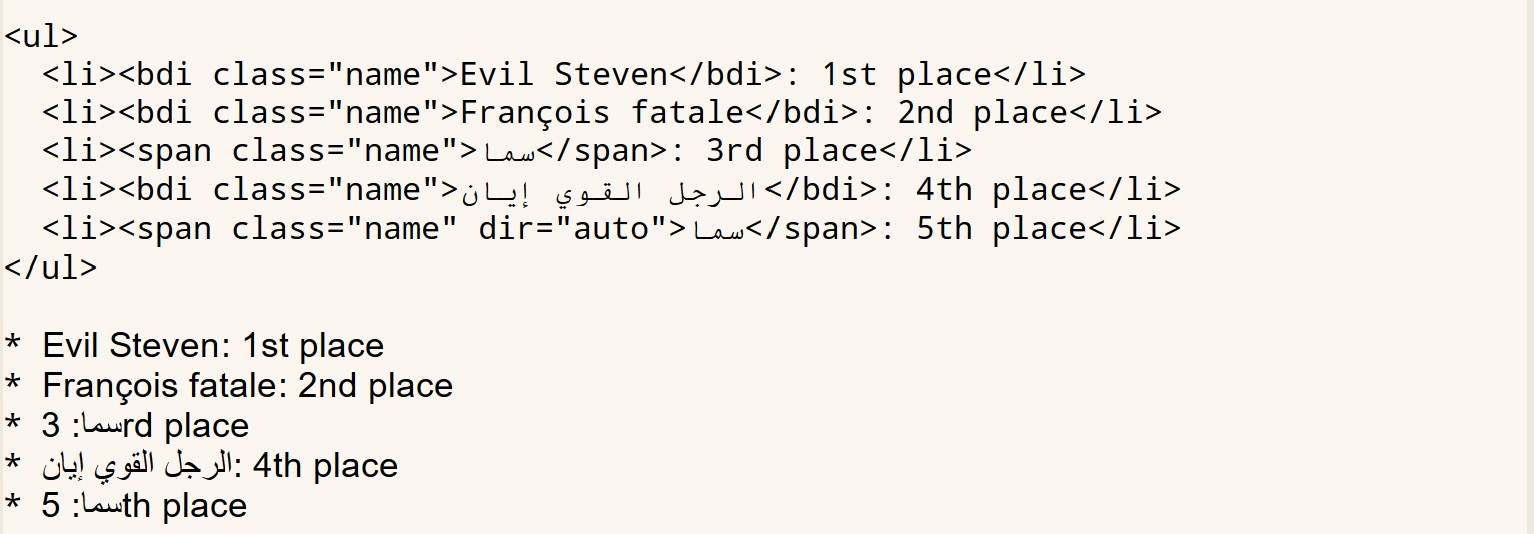
</div>总所周知,<span> 是一个“通用”的标签,就像 <div> 一样,那么 <bdi> 是什么东西?根据 MDN 的说法,HTML 双向隔离元素(Bi-Directional Isolation)告诉浏览器的双向算法将其包含的文本与周围的文本隔离,当网站动态插入一些文本且不知道所插入文本的方向性时,此功能特别有用。我们可以看看它给出的例子的效果:
<ul>
  <li><bdi class="name">Evil Steven</bdi>: 1st place</li>
  <li><bdi class="name">François fatale</bdi>: 2nd place</li>
  <li><span class="name">سما</span>: 3rd place</li>
  <li><bdi class="name">الرجل القوي إيان</bdi>: 4th place</li>
  <li><span class="name" dir="auto">سما</span>: 5th place</li>
</ul>- Evil Steven: 1st place
- François fatale: 2nd place
- سما: 3rd place
- الرجل القوي إيان: 4th place
- سما: 5th place
某些语言的书写顺序是从右向左,比如阿拉伯语和希伯来语,但是他们对数字仍然使用从左到右的顺序,这也叫所谓的双向文本(bidirectional text)。你可以注意到列表的第三项的显示效果与 HTML 源码并不一致,这应该能够体现 <bdi> 标签的作用。
顺带一提,Emacs 的 EWW 也有相似显示效果(也许是因为 Emacs 使用了 HarfBuzz,不过 EWW 目前不能识别 <span> 的 dir 属性),这可能能够说明它也采用了类似的排版算法:
也许我应该对生成的 secno 使用 <bdi> 标签,不过这对于中文和英文来说并不是需要考虑的问题,如果这个包真的有阿拉伯人使用的话也许会告诉我。
如果某个 Org-mode 文档的最小层级 headline 等级为 1,但是在第一个 * headline 的位置之前出现了 ** 或 *** 标题,ox-html 的目录生成会出现一点小问题:
** WTF
* FIRST<div id="table-of-contents" role="doc-toc">
<h2>Table of Contents</h2>
<div id="text-table-of-contents" role="doc-toc">
<ul>
<li><a href="#org6875f0b">0.1. WTF</a></li>
</ul>
</li>
<li><a href="#org36f768e">1. FIRST</a></div>
</div>你可以注意到 WTF 的序号是 0.1.,而且在它的下面有一个多余的 </ul> 标签,这和 ox-html 的 TOC 导出实现有关。考虑到这些次级标题的位置其实并不是很合适,也许可以在导出结果中去掉它们,不过更合理的方法是调整 TOC 代码来生成正确的目录。
我在这个月的六号开始写这篇博客。原本的内容是介绍 template 的导出,但是其中的 TOC 会涉及到 headline,因此在差不多写完的时候我又回过头来先写 headline。写完后一看差不多够一篇独立的博客了,那不如先发了再说。如果不出意外的话,下一篇总算是到了 template 和 inner-template。
感谢阅读。