


在 HTML 中,<meta> 标签被用来表示文档的元数据(metadata,即描述数据的数据)。在 MDN 中强调了这是不能被其他 tag 表示的信息,如 <base>, <link>, <script>, <style> 或 <title>。<meta> 的属性可为 name, http-equiv, charset 和 itemprop 之一,但一般来说 charset 和 name 最为常见。
在 ox-html 中,<meta> 及 <title> 的生成由 org-html--build-meta-info 负责,我对这个函数进行了拆分,得到 org-w3ctr--build-meta-info:
(defun t--build-meta-info (info)
  (declare (ftype (function (list) string))
           (important-return-value t))
  (concat
   ;; timestamp
   (when-let* ((ts (t--get-info-file-timestamp info)))
     (format "<!-- %s -->\n" ts))
   ;; charset
   (t--build-meta-entry "charset" (t--ensure-charset-utf8))
   ;; viewport
   (t--build-viewport-options info)
   ;; title
   (format "<title>%s</title>\n" (t--get-info-title-raw info))
   ;; meta tags
   (t--build-meta-tags info)))
本节大致按照这个函数的构建顺序展开。
在 ox-html 中,如果 :time-stamp-file (org-export-timestamp-file) 为非空值,那么 HTML 的头部会被插入一段标识生成时间的注释,具体来说就是如下代码:
;; in `org-html--build-meta-info'
(when (plist-get info :time-stamp-file)
       (format-time-string
	(concat "<!-- "
		(plist-get info :html-metadata-timestamp-format)
		" -->\n")))
可以看到,ox-html 选择通过 :html-metadata-timestamp-format (org-html-metadata-timestamp-format) 来让用户控制这一时间戳的格式,但是没有指定 ZONE 参数的 format-time-string 只会使用本地时间来格式化时间戳,这在不确定时区的情况下并不能准确地表示文档生成时间(除非你真的在 Zulu 时区)。
在 ox-w3ctr 中,我选择定义一个新的选项 :html-file-timestamp-function (org-w3ctr-file-timestamp-function) 来让用户指定生成时间戳的函数,它的默认情况如下,可以生成 UTC+0 格式的时间戳:
(defcustom t-file-timestamp-function #'t-file-timestamp-default-function
  :group 'org-export-w3ctr
  :type 'function)

(defun t-file-timestamp-default-function (_info)
  (format-time-string "%FT%RZ" nil t))
完整的负责生成时间戳注释的函数如下:
(defun t--get-info-file-timestamp (info)
  (when (t--pget info :time-stamp-file)
    (if-let* ((fun (t--pget info :html-file-timestamp-function))
              ((functionp fun)))
        (funcall fun info)
      (t-error ":html-file-timestamp-function is not valid: %s"
(t--pget info :html-file-timestamp-function)))))<meta charset="xxx"> 被用来指定整个 HTML 文档的编码,它只能是 utf-8,这是 HTML5 文档的唯一合法编码。在 ox-html 中,有个叫做 org-html-coding-system 的选项可以控制 Org 文档的 HTML 导出文档编码,这一选项在 org-html--build-meta-info 中用于获取字符集以及生成元信息标签:
(let* (...
       ;; Set title to an invisible character instead of leaving it
       ;; empty, which is invalid.
       (title (if (org-string-nw-p title) title "‎"))
       (charset (or (and org-html-coding-system
      		   (symbol-name
      		    (coding-system-get org-html-coding-system
      				       'mime-charset)))
      	            "iso-8859-1")))
  ...
  (if (org-html-html5-p info)
	 (org-html--build-meta-entry "charset" charset)
       (org-html--build-meta-entry "http-equiv" "Content-Type"
				   (concat "text/html;charset=" charset)))
  ...)
可以注意到,当 org-html-html5-p 返回非空值(使用 HTML5)时,org-html--build-meta-info 会使用 charset 属性,否则使用 http-equiv 属性,这一做法在 HTML 4.01 及以前比较常见。当开启 HTML5 模式(设定 org-html-doctype 为 html5)后,指定 org-html-coding-system 为非 UTF-8 编码实际上不是合法的行为。
直接影响将数据写入文件的编码的变量是 coding-system-for-write,在 org-export-to-file 中它被绑定为 org-export-coding-system,后者会在 HTML 导出过程中被绑定为 org-html-coding-system 指定的编码符号,如 utf-8-unix。如果我们仅仅指定为 utf-8 则可能会受到系统默认换行符或 Emacs 配置的影响。
ox-w3ctr 被我设计为导出 HTML5 的工具,看来只有 UTF-8 可以选择,没有必要专门设定一个 org-w3ctr-coding-system 选项。但是 UTF-8 可能比我们想象的还要稍微“多样”一点,Windows 上的一些软件会在文件头加上 BOM (Byte Order Mark),在 Emacs 中有多种 Coding System 对应于 UTF-8:
- 无 BOM 的 UTF-8:
utf-8,别名有mule-utf-8和cp65001 - 带 BOM 的 UTF-8:
utf-8-with-signature - 自动检测 BOM:
utf-8-auto
除 BOM 问题外,不同系统使用了不同的换行符,Windows(DOS) 使用 CRLF,Unix 使用 LF,而 MacOS 9.0 及以前使用 CR,10.0 及以后使用 LF。我们在以上编码系统加上
-dos, -unix 或 -mac 即可。
出于这些理由,org-w3ctr-coding-system 这个选项应该被保留,但一般情况下不需要修改它。Emacs 提供了根据 Coding System 获取标准编码名的函数 coding-system-get,我们可以使用它来检查指定的编码是否是 UTF-8:
(coding-system-get 'utf-8 :mime-charset)      ;;=> utf-8
(coding-system-get 'utf-8-unix :mime-charset) ;;=> utf-8
(coding-system-get 'utf-8-dos :mime-charset)  ;;=> utf-8
(coding-system-get 'utf-8-mac :mime-charset)  ;;=> utf-8

(coding-system-get 'mule-utf-8 :mime-charset) ;;=> utf-8
(coding-system-get 'cp65001    :mime-charset) ;;=> utf-8
(coding-system-get 'utf-8-with-signature :mime-charset) ;;=> nil
(coding-system-get 'utf-8-auto :mime-charset) ;;=> nil
你可以注意到对 utf-8-with-signature 和 utf-8-auto,coding-system-get 给出的结果是空值。作为实现者的我可以检查 org-w3ctr-coding-system 的值来允许指定带 BOM 的 UTF-8 编码,不过既然 HTML5 推荐不带 BOM,我也懒得处理了,下面的代码用于指定和获取 "utf-8" 字符串:
(defcustom t-coding-system 'utf-8-unix
  :group 'org-export-w3ctr
  :type '(radio (const utf-8-unix)
                (const utf-8-dos)
                (const utf-8-mac)))

(defun t--ensure-charset-utf8 ()
  (let* ((c t-coding-system)
         (h (lambda (_) (t-error "Invalid coding system: %s" c))))
    (unless (symbolp c) (funcall h c))
    (handler-bind ((coding-system-error h))
      (let* ((uc (coding-system-get c :mime-charset)))
(if (eq uc 'utf-8) "utf-8" (funcall h c))))))如果你写过简单的界面编程或游戏编程,你应该对视口 (viewport) 这个概念不陌生。在网页设计和开发中,视口是指用户目前可见的网页区域,即浏览器窗口中实际看到内容的那个部分;在游戏中,视口是玩家在屏幕上实际看到的游戏世界的一部分,一般来说只有位于视口内的内容才会被绘制出来,超出视口范围的内容通常不会被渲染,以节省性能。
就像游戏世界远大于相机的视口,多数情况下网页也不能通过视口得到完整呈现,我们需要使用滚动条或者移动按键(↑↓←→)来访问所有内容,这就像在第一人称游戏 (FPS) 中拖动鼠标来旋转镜头一样。
在 HTML 文档中可以使用 <meta name="viewport" content="..."> 来调节视口的大小,大多数情况下使用 <meta name="viewport" content="width=device-width, initial-scale=1"> 即可。除 width 和 initial-scale 属性外 viewport 还有很多其他属性,具体可以参考 MDN 的 viewport meta 标记。以下是 ox-w3ctr 中的相关代码,基本来自 ox-html:
(defcustom t-viewport '((width "device-width")
                        (initial-scale "1")
                        (minimum-scale "")
                        (maximum-scale "")
                        (user-scalable ""))
  ...)

(defun t--build-viewport-options (info)
  "Build <meta> viewport tags."
  (declare (ftype (function (list) (or null string)))
           (important-return-value t))
  (when-let* ((opts (cl-remove-if-not
                     #'t--nw-p (t--pget info :html-viewport)
                     :key #'cadr)))
    (t--build-meta-entry
     "name" "viewport"
     (mapconcat (pcase-lambda (`(,k ,v)) (format "%s=%s" k v))
                opts ", "))))
上面的代码 t--build-viewport-options 来自 ox-html 的 org-html--build-meta-info 代码片段:
(let ((viewport-options
       (cl-remove-if-not (lambda (cell) (org-string-nw-p (cadr cell)))
			 (plist-get info :html-viewport))))
  (if viewport-options
      (org-html--build-meta-entry "name" "viewport"
				  (mapconcat
				   (lambda (elm)
                                     (format "%s=%s" (car elm) (cadr elm)))
viewport-options ", "))))HTML 的 <title> 元素用于定义文档的标题,显示在浏览器的标题栏或标签页上。它只应该包含文本,若是包含有标签,则它包含的任何标签都将被忽略。
页面标题的内容可能对搜索引擎优化(SEO)具有重要意义。通常,较长的描述性标题要比简短或一般性标题更好。标题的内容是搜索引擎算法用来确定在搜索结果中列出页面顺序的组件之一。同样,标题是初始的“挂钩”,你可以通过它吸引浏览浏览结果页面的读者的注意力。
撰写好标题的一些准则和技巧:
- 避免使用一两个单词的标题。对于词汇表或参考样式的页面,请使用描述性短语或术语 - 定义对。
- 搜索引擎通常显示页面标题的前 55 至 60 个字符。超出此范围的文本可能会丢失,因此请尽量不要使标题更长。如果你必须使用较长的标题,请确保重要的部分出现在前面,并且标题中可能要删除的部分中没有关键内容。
- 不要使用“关键字集合”。如果标题只是单词列表,则算法通常会降低页面在搜索结果中的位置。
- 尝试确保你的标题在你自己的网站中尽可能唯一。标题重复(或几乎重复)可能会导致搜索结果不准确。
如你所见,<title> 标签内只能存在文本,因此即使 #+TITLE: 中使用了一些 Org-mode 标记我们也最好「还原」到一般文本并转义:
(defun t--get-info-title-raw (info)
;; HTML always need <title>, so just ignore :with-title.
(if-let* ((title (t--pget info :title))
(str0 (org-element-interpret-data title))
(str (t--nw-trim str0))
(text (t-plain-text str info)))
;; Set title to an invisible character instead of
;; leaving it empty, which is invalid.
text "‎"))在 ox-html 中,org-html--build-meta-info 主要负责生成 <head> 内的 <meta> 标签,其中的 org-html-meta-tags-default 负责生成除 charset 和 viewport 外的 <meta> 标签:
(defun org-html-meta-tags-default (info)
  (let ((author (and (plist-get info :with-author)
                     (let ((auth (plist-get info :author)))
                       ;; Return raw Org syntax.
                       (and auth (org-element-interpret-data auth))))))
    (list
     (when (org-string-nw-p author)
       (list "name" "author" author))
     (when (org-string-nw-p (plist-get info :description))
       (list "name" "description"
             (plist-get info :description)))
     (when (org-string-nw-p (plist-get info :keywords))
       (list "name" "keywords" (plist-get info :keywords)))
     '("name" "generator" "Org Mode"))))
你可以注意到 :author 的处理似乎有些特殊,这是因为它作为关键字使用了 parse 属性:
;; ox.el
(defconst org-export-options-alist
  '((:title "TITLE" nil nil parse)
    (:date "DATE" nil nil parse)
    (:author "AUTHOR" nil user-full-name parse)
    ...))
在额外 META 属性的选择上,ox-html 使用了作者,描述和关键词三个属性,以及最后的生成工具 generaotr。下面是关于它们的说明:
author文档的作者- 在
author属性的生成上,ox-html 使用org-element-interpret-data获取了作者的原始字符串,就这一实现方式上来看,也许我们在作者上应尽量使用 plain text。 description文档描述- 这一属性提供网页内容的简短摘要。这个描述通常会被搜索引擎抓取,并在搜索结果中显示,帮助用户了解页面内容。
keywords关键词- 列出与网页内容相关的关键词。虽然现代搜索引擎(尤其是 Google)对 keywords 的权重已大大降低,但某些旧版或特定的搜索引擎可能仍会参考。关键词建议使用逗号 (
,) 进行分隔。 generator生成器- 指明生成当前页面的软件或工具。对 Org-mode 那当然是 Org mode。
我对 org-html-meta-tags-default 进行了拆分,得到如下代码:
(defun t--get-info-author-raw (info)
  (when-let* (((t--pget info :with-author))
              (a (t--pget info :author)))
    ;; Return raw Org syntax.
    ;; #+author is parsed as Org object.
    (t--nw-trim (org-element-interpret-data a))))

(defun t-meta-tags-default (info)
  (list
   (when-let* ((author (t--get-info-author-raw info)))
     (list "name" "author" author))
   (when-let* ((desc (t--nw-trim (t--pget info :description))))
     (list "name" "description" desc))
   (when-let* ((keyw (t--nw-trim (t--pget info :keywords))))
     (list "name" "keywords" keyw))
   '("name" "generator" "Org Mode")))
考虑到在 ox-html 中 KEYWORDS 关键词的解析方式是 space,在编写 Org 文档时使用空白字符分隔各关键词即可,但在导出到 <meta> 标签时可以考虑将空格替换为逗号 ,,这是比较主流和推荐的做法。不过这并不怎么重要。
HTML 的 <style> 元素包含文档的样式信息或文档的部分内容。其中的 CSS 会应用于包含 <style> 元素的文档内容。<style> 元素必须包含在文档的 <head> 内。一般来说,最好将样式放在外部样式表中,然后使用 <link> 元素应用它们。如果在文档中包含多个 <style> 和 <link> 元素,它们将按照在文档中包含的顺序应用到 DOM。
HTML <script> 元素用于嵌入可执行代码或数据,这通常用作嵌入或者引用 JavaScript 代码。
除了直接使用 <style> 嵌入样式表外,我们可以直接在 #+HEAD: 或 #+HEAD_EXTRA: 中使用 <link> 加入外部样式,但是对于单个 Org 文件的 HTML 导出而言直接嵌入默认样式是最好的做法,因为没有外部依赖。同样地,如果要用到一些 JavaScript 脚本,直接使用 <script> 嵌入也是最佳做法,对 Org 来说主要是数学公式渲染相关的脚本。
在 ox-html 中,是否引入默认样式表这一行为由 :html-head-include-default-style 属性决定,它的选项名为 html-style,默认值为 org-html-head-include-default-style (t)。ox-html 的默认样式存储在 org-html-style-default 中,它的构建代码位于 org-html--build-head 中:
;; org-html--build-head
(when (plist-get info :html-head-include-default-style)
      (org-element-normalize-string org-html-style-default))
ox-html 的默认 CSS 只有不到 200 行,但是 W3C 技术报告的默认 CSS 有上千行,直接嵌入 Elisp 源代码并不是很好的做法。我选择了将 CSS 放到单独的文件中,然后在需要嵌入 CSS 时从文件加载并缓存到变量中避免多次重复加载:
(defcustom t-head-include-style t
  :group 'org-export-w3ctr
  :type 'boolean)

(defcustom t-style ""
  :group 'org-export-w3ctr
  :type 'string)

(defcustom t-style-file (file-name-concat t--dir "assets" "style.css")
  :group 'org-export-w3ctr
  :type '(choice (const nil) file))
下面是具体的实现代码:
(defun t--load-css (_info)
  (let ((css (or (when (t--nw-p t-style) t-style)
                 (when t-style-file
                   (setq t-style (t--load-file t-style-file)))
                 "")))
    (if (string-empty-p css) ""
      (format "<style>\n%s\n</style>\n" css))))

(defun t-clear-css ()
  (interactive)
  (setq t-style ""))
最后的 (t--load-file ...) 还可以加上 t--normalize-string 来确保获取的 CSS 文本末尾只有一个换行。
Org-mode 本身支持 LaTeX 风格的数学公式,但并不直接负责 Latex 到 HTML 的渲染。在我的设想中,一种方式是在浏览器中使用 MathJax 渲染 LaTeX 到 CHTML,另一种是在生成时使用 MathJax 渲染 Latex 到 MathML,最后是让用户脑内渲染(笑)。当然,在网页上渲染 LaTeX 数学公式的解决方案并不只有 MathJax 一种。
能够直接在浏览器中渲染的只有 HTML 代码和 MathML 代码(后者可看作前者的子集),让 LaTeX 能够显示的方式很多,可以完全在浏览器端渲染,从 LaTeX 到 CHTML 或 MathML,或者是完全在 Emacs 生成端渲染。生成产物可以是 HTML(MathML) 或 SVG 格式图片。
按 CSR(客户端渲染)和 SSR(服务端渲染)分类,LaTeX 渲染的实现方法可以分为两大类:
- CSR 方案:
- SSR 方案:
- LaTeX+dvipng/dvisvg,使用 LaTeX 配合其他工具生成图片
- MathJax,它也支持从 Node 使用
- TEMML,从 LaTeX 渲染得到 MathML
- latex2html, 等等
从兼容性来说生成图片是最好的选择,即使不支持 JS 和 CSS 的浏览器(比如 eww)也能正常显示它们。既然 MathJax 同时支持 CHTML,MathML 和 Svg 输出,我干脆就一站式解决了(只不过目前我还没有支持 Svg 输出)。目前()4.0.0-rc.4 版本已释出,今年年底之前应该能够正式发布第四版。 MathJax 4.0.0 于 发布了!下面的代码是数学公式的渲染选项:
(defcustom t-with-latex 'mathjax
  :group 'org-export-w3ctr
  :type '(choice
          (const :tag "Disable math processing" nil)
          (const :tag "Use MathJax to display math" mathjax)
          (const :tag "Use MathJax to render mathML" mathml)
          (const :tag "Use custom method" custom)))
MathJax CSR 渲染需要一些 JS 配置代码,在 ox-html 中与之相关的有选项 org-html-mathjax-options 和 org-html-mathjax-template 和构建函数 org-html--build-mathjax-config。某种意义上来说 MathJax 配置提供默认的即可,用户可以根据自己的需要自行调整,我在 ox-w3ctr 中直接使用了由 ox-html 生成的配置字符串:
(defcustom t-mathjax-config "\
<script>
...
</script>

<script
  id='MathJax-script'
  async
  src='https://cdn.jsdelivr.net/npm/mathjax@3/es5/tex-mml-chtml.js'>
</script>"
  :group 'org-export-w3ctr
  :type 'string)
不过话又说回来,即便是生成 MathML 的 SSR 方式也需要一些配置代码,比如 MathML 标记的 CSS 样式,所以也有如下相关选项:
(defcustom t-mathml-config ""
  :group 'org-export-w3ctr
  :type 'string)

(defcustom t-math-custom-function #'t-math-custom-default-function
  :group 'org-export-w3ctr
  :type 'function)
最后是生成配置字符串的函数 org-w3ctr--build-math-config:
(defun t-math-custom-default-function (_info)
  "")

(defun t--build-math-config (info)
  (let* ((type (t--pget info :with-latex))
         (key (pcase type
                (`nil nil)
                (`mathjax :html-mathjax-config)
                (`mathml :html-mathml-config)
                (`custom :html-math-custom-function)
                (o (t-error "Unrecognized math option: %s" o))))
         (value (and key (t--pget info key))))
    (cond
     ((null key) "")
     ((eq type 'custom) (t--normalize-string (funcall value info)))
     (t (if (t--nw-p value) (t--normalize-string value) "")))))
对数学公式渲染方案的讨论
在 2025 年 7 月 9 日,Jacob S. Gordon(以下简称 JSG)在 emacs-orgmode 邮件列表上讨论了 MathML in HTML export。他的目标是寻找一种比传统的图片(SVG/PNG)或纯 JavaScript(如仅依赖 MathJax)更好的方法来在网页上展示数学公式。他认为 MathML 是一个理想的选择,因为它是一种原生的 Web 标准。
邮件主体部分详细评测了三种将 Org Mode 中的 LaTeX 公式转换为 MathML 的技术方案,并分析了各自的优缺点。首先,为什么使用 MathML?
- 这是对 Latex 的优雅降级 (Graceful Degradation):
- 即使没有 MathJax 这样的 JS 库,主流现代浏览器也能直接渲染 MathML,至少是 MathML Core。
- MathJax 本身也支持读取 MathML 格式,并能为其提供更好的辅助功能支持。
- 与 HTML/CSS 深度集成:
- 基线对齐:浏览器会自动处理公式与周围文本的垂直对齐问题。
- 深色模式:能自动适应系统的深色模式,无需额外配置。
- CSS 样式化:可以用 CSS 控制公式的样式
接着,JSG 提到了三种从 TeX 到 MathML 的方案,分别是 LaTeXML,tex4ht 和 pandoc,但是他也说到这些工具用于将完整的 TeX 文件转换为 HTML,如果我们的目标只是将 TeX 片段导出到 HTML,那么可以这样做(下面的三个命令是它们的部件或具体用法):
- 使用
latexmlmath,以及latexmlc:latexmlc 'literal:\[\sqrt{1+x^2}\]' --profile=math --presentationmathml - 使用
make4ht,它可以从标准输入读取片段:make4ht - "mathml" <<< "\documentclass{standalone} \begin{document}\[\sqrt{1+x^2}\]\end{document}" - 使用
pandoc:pandoc -f latex -t html5 --mathml <<< '\[\sqrt{1+x^2}\]' | sed 's/<\/\?p>//g'
不过 JSP 也提到这些命令的效率比较低,一个公式甚至需要几秒。对我来说,使用 node 上的 MathJax 和 JSONRPC 来发起转换 LaTeX 到 MathML 的 RPC 效率意外地还不错,不过这部分代码目前还没有很好的测试,也许等我写到 LaTeX 相关部分会完善它们。
在搞定了最后的默认 CSS 和数学公式 JS 后,整个 <head> 的生成就没有问题了:
(defun t--use-default-style-p (info)
  (t--pget info :html-head-include-style))

(defun t--has-math-p (info)
  (and (t--pget info :with-latex)
       (org-element-map (t--pget info :parse-tree)
           '(latex-fragment latex-environment)
         #'identity info t nil t)))

;; FIXME: Consider add code hightlight (such as highlight.js) codes.
(defun t--build-head (info)
  (concat
   "<head>\n"
   ;; <meta>
   (t--build-meta-info info)
   ;; <style>
   (when (t--use-default-style-p info) (t--load-css info))
   ;; Mathjax or MathML config.
   (when (t--has-math-p info) (t--build-math-config info))
   ;; User defined <head> contents
   (t--normalize-string (t--pget info :html-head))
   (t--normalize-string (t--pget info :html-head-extra))
   "</head>\n"))
不过至少是目前,我还没有考虑使用 highlight.js 提供代码高亮的 CSR 支持,之后再说吧。
导航栏(Navbar)是网页顶部(或侧边)常见的界面组件,用于显示网站的主要结构、链接或操作入口。大部分的博客都提供了这样的元素:

导航栏提供前往主页、栏目、分类、用户页面等的快捷入口,网页用户可以随时访问网站主要功能,一般的导航栏还会加上网站 Logo 或网站名。根据导航栏的漂浮方式还可以分为粘性导航栏和固定导航栏,前者会随用户滚动页面同步移动,后者会始终浮在页面最上层。
ox-html 的导航栏只有最基本的功能:父页面/主页,这可以通过在 Org 文档中使用 #+HTML_LINK_UP (org-html-link-up) 和 #+HTML_LINK_HOME (org-html-link-home)指定,比如 Org-mode 的某些 Worg 页面:
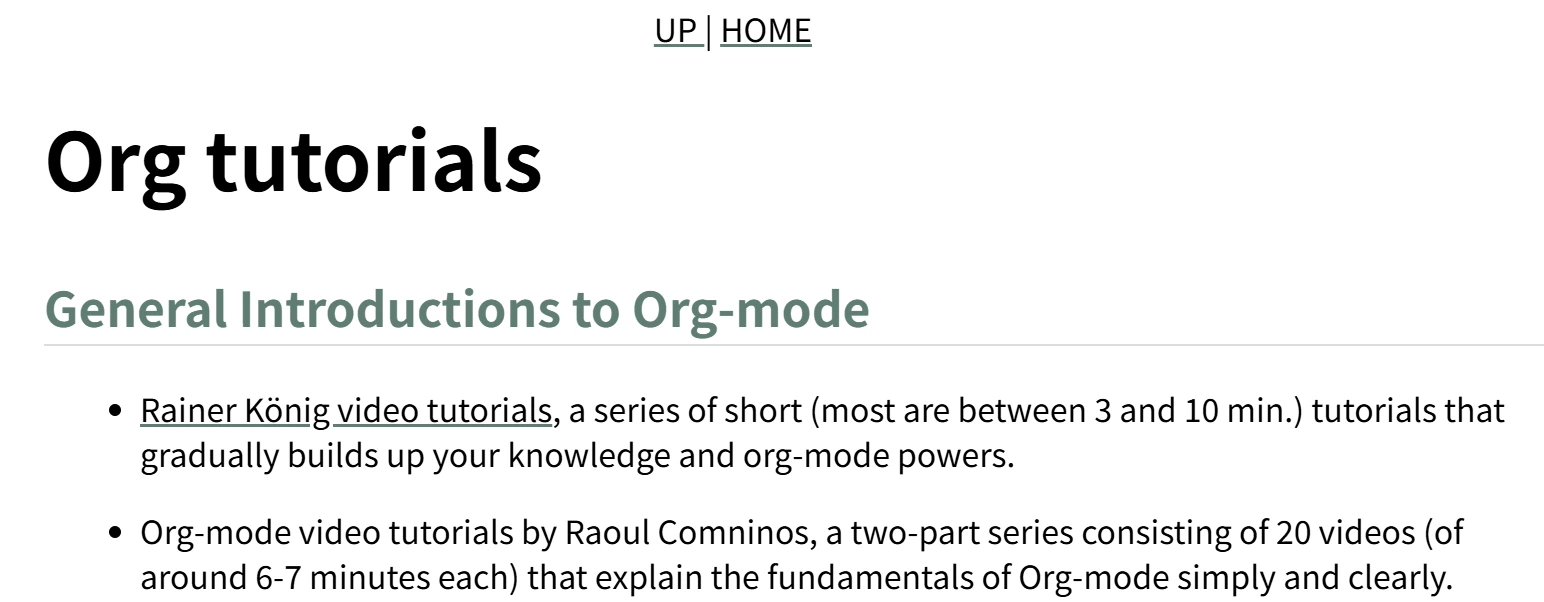
在 ox-html 中,导航栏(或者叫 home-and-up)的构建与 org-html-home/up-format 有关,它在 org-html-template 的生成代码如下:
(defcustom org-html-home/up-format
  "<div id=\"org-div-home-and-up\">
 <a accesskey=\"h\" href=\"%s\"> UP </a>
 |
 <a accesskey=\"H\" href=\"%s\"> HOME </a>
</div>"
  "Snippet used to insert the HOME and UP links.
This is a format string, the first %s will receive the UP link,
the second the HOME link.  If both `org-html-link-up' and
`org-html-link-home' are empty, the entire snippet will be
ignored."
  :group 'org-export-html
  :type 'string)

;; org-html-template
(let ((link-up (org-trim (plist-get info :html-link-up)))
      (link-home (org-trim (plist-get info :html-link-home))))
  (unless (and (string= link-up "") (string= link-home ""))
    (format (plist-get info :html-home/up-format)
	    (or link-up link-home)
	    (or link-home link-up))))
如果要说这种做法有什么问题的话,那就是 UP 和 HOME 文本是固定的,用户也不能控制导航栏项目的数量。
考虑到通过 #+HTML_LINK_{UP/HOME} 来指定导航栏内容仍不失为一种简便的方法,我通过如下代码“复刻”了 ox-html 的行为:
(defcustom t-link-home ""
  :group 'org-export-w3ctr
  :type 'string)

(defcustom t-link-up ""
  :group 'org-export-w3ctr
  :type 'string)

(defcustom t-home/up-format
  "<nav id=\"navbar\">\n <a href=\"%s\"> UP </a>
 <a href=\"%s\"> HOME </a>\n</div>"
  :group 'org-export-w3ctr
  :type 'string)

(defun t-legacy-format-home/up (info)
  (declare (ftype (function (plist) (or null string)))
           (pure t) (important-return-value t))
  (let ((link-up (t--nw-trim (plist-get info :html-link-up)))
        (link-home (t--nw-trim (plist-get info :html-link-home))))
    (unless (and (null link-up) (null link-home))
      (format (plist-get info :html-home/up-format)
(or link-up link-home) (or link-home link-up)))))在 ox-html 中,#+HTML_LINK_{UP/HOME} 中的链接会填入 <a> 标签形成链接,既然 Org 本身支持导出链接,那不如直接使用关键词解析来得到链接对象并导出:
(org-export-define-backend 'w3ctr
  '(...)
  ...
  :options-alist
  ...
  (:html-link-navbar "HTML_LINK_NAVBAR" nil t-link-navbar parse)
  ...)

(defun t--format-navbar-nav (s)
  (format "<nav id=\"navbar\">\n%s\n</nav>\n" s))

(defun t--format-navbar-list (ll info)
  (if (null ll) ""
    (let* ((elems (mapcar (lambda (x) (org-export-data x info)) ll))
           (links (cl-remove-if-not #'t--nw-p elems))
           (as (mapcar #'t--trim links)))
(t--format-navbar-nav (string-join as "\n")))))直接使用链接对象的一个问题是它不能比较容易地在导出前通过代码指定,因此我也提供了使用向量格式的链接列表来生成导航栏:
(defun t--format-navbar-vector (v)
  (if (equal v []) ""
    (t--format-navbar-nav
     (mapconcat
      (pcase-lambda (`(,link . ,name))
        (format "<a href=\"%s\">%s</a>" link name))
      v "\n"))))
将代码组合起来,就得到了导出导航栏的代码:
(defcustom t-link-navbar nil
  "Navigation bar links. Can be:
- A vector of (URL . NAME) pairs, e.g [(\"../index.html\" . \"Up\")]
- A list of Org elements (from HTML_LINK_NAVBAR)
- nil to use the legacy home/up behavior"
  :group 'org-export-w3ctr
  :type 'sexp)

(defcustom t-format-navbar-function #'t-format-navbar-default-function
  :group 'org-export-w3ctr
  :type 'function)

(defun t-format-navbar-default-function (info)
  (let* ((links (t--pget info :html-link-navbar))
         (p (lambda (x) (and (stringp (car-safe x))
                             (stringp (cdr-safe x))))))
    (pcase links
      ((pred vectorp)
       (or (and (cl-every p links) (t--format-navbar-vector links))
           (t-error "Invalid navbar vector: %s" links)))
      ((pred listp)
       (let ((res (t--format-navbar-list links info)))
         (if (not (string-empty-p res)) res
           (or (t--format-legacy-navbar info) ""))))
(other (t-error "Invalid navbar type: %s" other)))))preamble (弁言,biàn yán) 是是文件中的介绍性及表达性陈述,用于解释文件的目的及基本理念。postamble 似乎没有明确对应的中文,也许可以叫做 后文,后记,或者 跋,它指的是文档的结尾部分,通常用于总结全文,或添加一些补充说明、致谢或后续事项。
从 ox-html 的做法来看,它们可能和这两个词的原意有些区别,更强调 pre/postabmle 的位置而不是具体的内容。在 ox-html 的 org-html-template 函数中,Preamble 位于 home and up 之后,位于 inner-template 之前;Postamble 位于 inner-template 之后,位于 </body> 之前。而且它们一般不由 Org-mode 源文件中的内容直接指定,而是通过一些选项。由此来看,pre/postamble 可能更适合填充文件通用内容,比如文件元信息。
在 W3C 标准文档中,在正文开始之前一般会有一个 More details about this document,比如 CSS Values and Units Module Level 4:
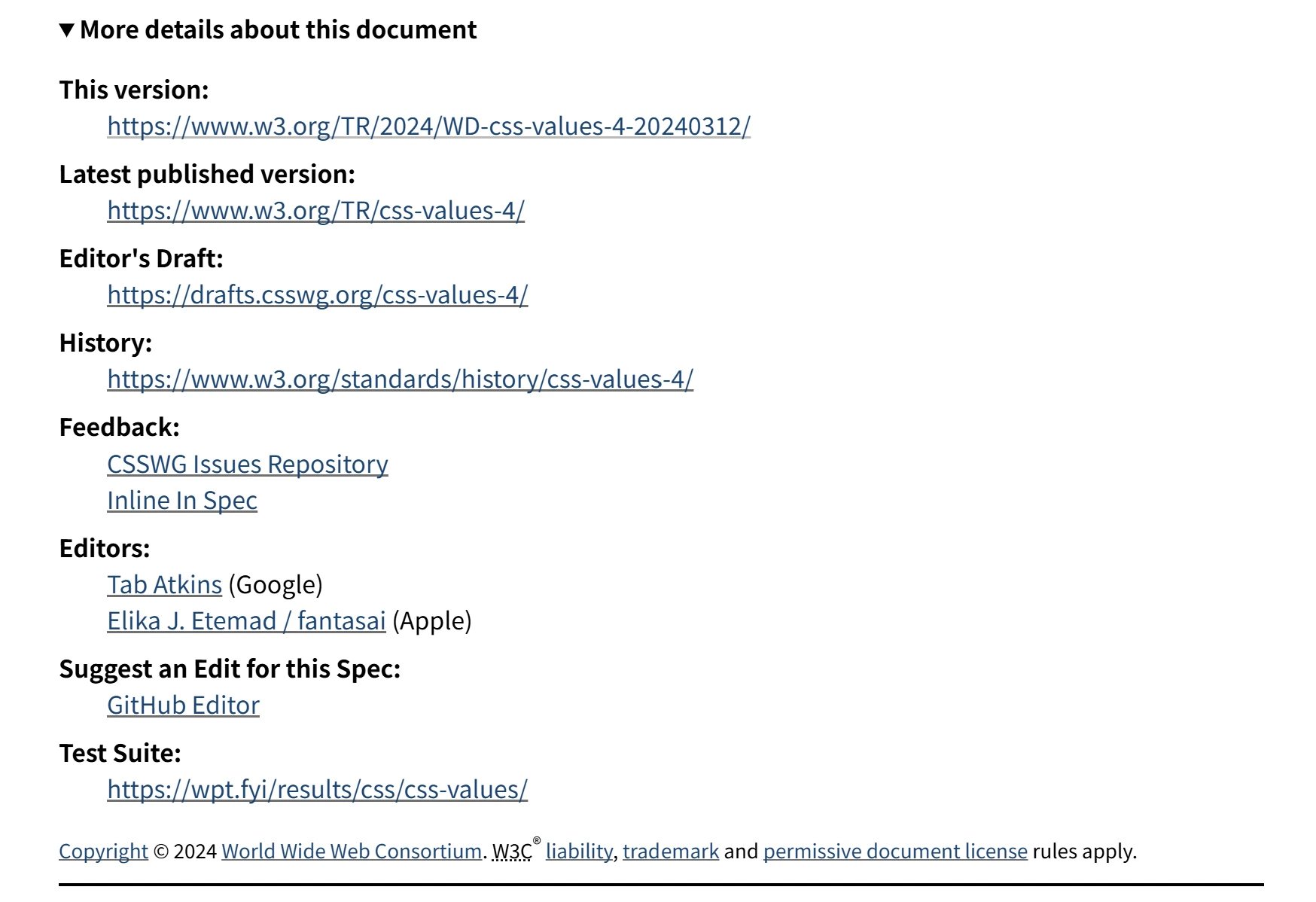
这正好对应到 ox-html 的 preamble。
ox-html 使用 org-html-format-spec 来创建用于 pre/postamble 的格式化字符 spec,ox-w3ctr 与它基本保持一致。ox-html 为 pre/postamble 的导出添加了如下选项:
:html-preamble(org-html-preamble),指定 preamble 的内容:html-postabmle(org-html-postamble),指定 postamble 的内容
pre/postamble 选项的可用项大差不差,若为 nil 则表示不导出 pre/postamble;若为 t 则导出默认的 pre/postamble,若为字符串则使用 org-html-format-spec 生成的 format-spec 来格式化字符串;若为接受 INFO 的函数则调用函数并使用函数返回的字符串。
(defun org-html--build-pre/postamble (type info)
  (let ((section (plist-get info (intern (format ":html-%s" type))))
	(spec (org-html-format-spec info)))
    (when section
      (let ((section-contents
	     (if (functionp section) (funcall section info)
	       (cond
		((stringp section) (format-spec section spec))
		((and (eq section 'auto) (eq type 'postamble))
                 ...)
                (t
		 (let ((formats (plist-get info (if (eq type 'preamble)
						    :html-preamble-format
						  :html-postamble-format)))
		       (language (plist-get info :language)))
		   (format-spec
		    (cadr (or (assoc-string language formats t)
			      (assoc-string "en" formats t)))
		    spec)))))))
        ...))))
当 :html-preamble 或 :html-postamble 为 t 时(更准确的说法是不为字符串的非 nil 值),org-html--build-pre/postamble 会从 :html-preamble-format (org-html-preamble-format) 和 :html-postamble-format (org-html-postamble-format) 中提取可用的 pre/postamble。
(defcustom org-html-postamble-format
  '(("en" "<p class=\"author\">Author: %a (%e)</p>
<p class=\"date\">Date: %d</p>
<p class=\"creator\">%c</p>
<p class=\"validation\">%v</p>"))
  ...)
postamble 多出来的一项是 auto,指定它将收集可用的信息来生成 postamble,不过这个描述相当模糊,具体可以参考 org-html--build-pre/postamble 的实现代码。
从某种意义上来说,ox-html 的 pre/postamble 设计过于“复杂”了。:html-preamble-format 似乎是为了给不同的语言准备不同的字符串,但是用户一般情况下不会频繁切换 Org-mode 原文档的语言。在 ox-w3ctr 中,我去掉了 :html-pre/postamble-format 选项,并且让 :html-preamble 和 :html-postamble 接受如下选项。与 ox-html 相反,我让 preamble 默认导出,而默认不导出 postamble:
(defcustom t-preamble #'t-preamble-default-function
  "Controls the insertion of a preamble in the exported HTML.

It can be one of the following types:
- string: The string will be formatted using `format-spec' and
  inserted. See `org-w3ctr--pre/postamble-format-spec' for available
  format codes (e.g., %d, %c).
- function: The function is called with the INFO plist, and its return
  value is inserted.
- symbol: If the symbol is a function, it is called as above.
  Otherwise, its string value is retrieved and formatted.
- nil: No preamble is inserted."
  :group 'org-export-w3ctr
  :type '(choice string function symbol))

(defcustom t-postamble nil
  "Controls the insertion of a postamble in the exported HTML.

See `org-w3ctr-preamble' for more information."
  :group 'org-export-w3ctr
  :type '(choice string function symbol))
以下是我的 t--build-pre/postamble 实现:
(defun t--build-pre/postamble (type info)
  "Build the preamble or postamble string.

This function reads the configuration from `:html-preamble' or
`:html-postamble' based on TYPE.  TYPE should be the symbol `preamble'
or `postamble'."
  (declare (ftype (function (symbol list) string))
           (important-return-value t))
  (let ((section (t--pget info (intern (format ":html-%s" type))))
        (spec (t--pre/postamble-format-spec info))
        it)
    (cond
     ((null section) (setq it ""))
     ;; string formatted with `format-spec'.
     ((stringp section) (setq it (format-spec section spec)))
     ;; function.
     ((functionp section) (setq it (funcall section info)))
     ;; symbol's function cell is nil or not a function.
     ((symbolp section)
      (if-let* ((value (symbol-value section))
                ((t--nw-p value)))
          (setq it (format-spec value spec))
        ;; When pre/postamble's value type is symbol and symbol's
        ;; function cell is nil, its value cell must be string type.
        (t-error "Invalid %s symbol value: %s"
                 type (symbol-value section))))
     ;; not nil, string or symbol
     (t (t-error "Invalid %s: %s" type section)))
(or (and (t--nw-p it) (t--normalize-string it)) "")))在 W3C 技术文档的 preamble 结束处会表明文档的版权信息,就像这样:

在看到这一行文本时,我也想着能不能给我的文档也弄个版权信息,顺便加上 CC 吧唧(budget),于是就有了如下代码:
(defcustom t-use-cc-budget t
  "Use CC budget or not."
  :group 'org-export-w3ctr
  :type 'boolean)

(defcustom t-public-license nil
  "Default license for exported content. Value should be one of the
supported Creative Commons licenses or variants."
  :group 'org-export-w3ctr
  :type '(choice
          (const nil) (const cc0)
          (const all-rights-reserved)
          (const all-rights-reversed)
          (const cc-by-4.0) (const cc-by-nc-4.0)
          (const cc-by-nc-nd-4.0) (const cc-by-nc-sa-4.0)
          (const cc-by-nd-4.0) (const cc-by-sa-4.0)
          (const cc-by-3.0) (const cc-by-nc-3.0)
          (const cc-by-nc-nd-3.0) (const cc-by-nc-sa-3.0)
          (const cc-by-nd-3.0) (const cc-by-sa-3.0)))

(defcustom t-format-license-function #'t-format-license-default-function
  "Default function to build license string."
  :group 'org-export-w3ctr
  :type 'function)
license-code
;;;; CC license budget
;; Options
;; - :html-use-cc-budget (`org-w3ctr-use-cc-budget')
;; - :html-license (`org-w3ctr-public-license')
;; - :html-format-license-function (`org-w3ctr-format-license-function')

(defconst t-public-license-alist
  '((nil "Not Specified")
    (all-rights-reserved "All Rights Reserved")
    (all-rights-reversed "All Rights Reversed")
    (cc0 "CC0" "https://creativecommons.org/public-domain/cc0/")
    ;; 4.0
    ( cc-by-4.0 "CC BY 4.0"
      "https://creativecommons.org/licenses/by/4.0/")
    ( cc-by-nc-4.0 "CC BY-NC 4.0"
      "https://creativecommons.org/licenses/by-nc/4.0/")
    ( cc-by-nc-nd-4.0 "CC BY-NC-ND 4.0"
      "https://creativecommons.org/licenses/by-nc-nd/4.0/")
    ( cc-by-nc-sa-4.0 "CC BY-NC-SA 4.0"
      "https://creativecommons.org/licenses/by-nc-sa/4.0/")
    ( cc-by-nd-4.0 "CC BY-ND 4.0"
      "https://creativecommons.org/licenses/by-nd/4.0/")
    ( cc-by-sa-4.0 "CC BY-SA 4.0"
      "https://creativecommons.org/licenses/by-sa/4.0/")
    ;; 3.0 (not recommended by Creative Commons)
    ( cc-by-3.0 "CC BY 3.0"
      "https://creativecommons.org/licenses/by/3.0/")
    ( cc-by-nc-3.0 "CC BY-NC 3.0"
      "https://creativecommons.org/licenses/by-nc/3.0/")
    ( cc-by-nc-nd-3.0 "CC BY-NC-ND 3.0"
      "https://creativecommons.org/licenses/by-nc-nd/3.0/")
    ( cc-by-nc-sa-3.0 "CC BY-NC-SA 3.0"
      "https://creativecommons.org/licenses/by-nc-sa/3.0/")
    ( cc-by-nd-3.0 "CC BY-ND 3.0"
      "https://creativecommons.org/licenses/by-nd/3.0/")
    ( cc-by-sa-3.0 "CC BY-SA 3.0"
      "https://creativecommons.org/licenses/by-sa/3.0/"))
  "Alist mapping license symbols to their display names and URLs.
Each element is of form (SYMBOL DISPLAY-NAME &optional URL).")

(defvar t--cc-svg-hashtable (make-hash-table :test 'equal)
  "Hash table stores base64 encoded svg file contents.

Include cc, by, sa, nc, nd, and zero.")

(defun t--load-cc-svg (name)
  "Load SVG file with given NAME from assets directory, return as
base64 encoded string. If the file does not exist, raise an error."
  (declare (ftype (function (string) string))
           (important-return-value t))
  (let ((file (file-name-concat t--dir "assets" (concat name ".svg"))))
    (if (not (file-exists-p file))
        (t-error "Svg budget not exists: %s" file)
      (with-temp-buffer
        (t--insert-file file)
        (base64-encode-region (point-min) (point-max) t)
        (buffer-substring-no-properties (point-min) (point-max))))))

(defun t--load-cc-svg-once (name)
  "Load SVG file with given NAME once and cache it in a hash table.
If the SVG is already cached, return the cached base64 string."
  (declare (ftype (function (string) string))
           (important-return-value t))
  (with-memoization (gethash name t--cc-svg-hashtable)
    (t--load-cc-svg name)))

(defun t--build-cc-img (base64)
  "Create HTML img tag with embedded BASE64 encoded SVG.

See https://chooser-beta.creativecommons.org/"
  (declare (ftype (function (string) string))
           (pure t) (important-return-value t))
  (format "<img style=\"height:1.4em!important;margin-left:0.2em;\
vertical-align:text-bottom;\" src=\"data:image/svg+xml;base64,%s\" \
alt=\"\">" base64))

(defun t--get-cc-svgs (license)
  "Get HTML img tags for Creative Commons LICENSE icons.

For CC0 license, returns both `cc' and `zero' icons. For other licenses,
splits the license name to get individual component icons."
  (declare (ftype (function (symbol) string))
           (important-return-value t))
  (let ((names (if (eq license 'cc0) '("cc" "zero")
                 (split-string (symbol-name license) "[0-9.-]" t)))
        (f (lambda (x) (t--build-cc-img (t--load-cc-svg-once x)))))
    (mapconcat f names)))

(defun t--get-info-author (info)
  "Get exported author string from INFO if :with-author is non-nil."
  (declare (ftype (function (list) (or null string)))
           (important-return-value t))
  (when-let* (((t--pget info :with-author))
              (a (t--pget info :author)))
    (t--nw-trim (org-export-data a info))))

(defun t-format-license-default-function (info)
  "Generate HTML string describing the public license for a work.

Extracts license information from INFO plist and formats it with author
attribution and appropriate Creative Commons icons when applicable."
  (declare (ftype (function (list) string))
           (important-return-value t))
  (let* ((license (t--pget info :html-license))
         (details (assq license t-public-license-alist))
         (is-cc (string-match-p "^cc" (symbol-name license)))
         (use-budget (t--pget info :html-use-cc-budget))
         (author (t--get-info-author info)))
    (unless details
      (t-error "Unknown license: %s" license))
    (pcase (cdr details)
      (`(,name) name)
      (`(,name ,link)
       (concat
        "This work"
        (when (and author (not (eq license 'cc0)))
          (concat " by " author))
        " is licensed under "
        (if (null link) name
          (format "<a href=\"%s\">%s</a>" link name))
        (when (and is-cc use-budget)
          (concat " " (t--get-cc-svgs license)))))
      (_ (t-error "Internal error")))))

(defun t-format-public-license (info)
  "Generate HTML string describing the public license for a work."
  (declare (ftype (function (list) string))
           (important-return-value t))
  (funcall (t--pget info :html-format-license-function) info))
简单来说,上面的代码实现了对无许可证,All Rights Reserved 和 All Rights ReVersed,以及各种 CC 协议的支持,比较有意思的部分是支持插入 CC 徽章,实现方法是将徽章的 SVG 图片以 base64 嵌入 img 标签中。用户也可以完全无视掉这些选项,使用 :html-format-license-function 指定自己的许可证字符串生成函数。下图为生成的许可证字符串示例:

下面的函数负责生成类似 W3C 技术文档的 preamble:
(defun t-preamble-default-function (info)
  "Return a default HTML preamble string with document metadata.

The generated HTML uses a <details> element to display the document's
publication date, modification date, creator tools, and license.
It takes the export options plist INFO as its argument."
  (concat
   "<details open>\n"
   "<summary>More details about this document</summary>\n"
   "<dl>\n"
   ;; Create or finish time.
   "<dt>Drafting to Completion / Publication:</dt> <dd>"
   (or (t--get-info-date info) "[Not Specified]")
   "</dd>\n"
   ;; Modification time.
   "<dt>Date of last modification:</dt> <dd>"
   (t--get-info-mtime info)
   "</dd>\n"
   ;; Creation tools.
   "<dt>Creation Tools:</dt> <dd>"
   (or (t--pget info :creator) "[Not Specified]")
   "</dd>\n"
   ;; License.
   "<dt>Public License:</dt> <dd>"
   (t-format-public-license info)
   "</dd>\n"
   "</dl>\n"
   "</details>\n"
   "<hr>"))
如上所述,在 ox-w3ctr 中 postamble 默认不导出,这是因为 W3C 技术文档的元信息在开头而不是结尾。用户也可以选择使用 postamble 插入一些其他的信息,比如 powered by cloudflare。
在 ox-html.el 中,目录的导出大致位于 2450 到 2620 行左右,大概一百六七十行。ox-w3ctr 总行数也差不多,但是做出了一些比较重要的改进。
目录的导出由 org-html-toc 这个函数来完成,它接受 depth, info 和 scope 三个参数(最后一个为可选参数),info 不必多说,depth 用于确定目录的深度,scope 用于确定目录的范围。在函数的开头会调用 org-html--format-toc-headline 和 org-export-get-relative-level 来获取范围内的标题 HTML 字符串和标题级别序对组成的列表:
(let ((toc-entries
       (mapcar (lambda (headline)
      	         (cons (org-html--format-toc-headline headline info)
      		       (org-export-get-relative-level headline info)))
      	       (org-export-collect-headlines info depth scope))))
  ...)
org-html--format-toc-headline 对标题元素的导出做了一些特殊处理,具体特殊在哪里可以看看实现,这里就不详细展开了。接下来,如果获取到的 (headline . level) 列表不为空则会生成目录的 HTML 内容:
(when toc-entries
  (let* ((toc-id-counter (plist-get info :org-html--toc-counter))
         (toc (concat (format "<div id=\"text-table-of-contents%s\" role=\"doc-toc\">"
                              (if toc-id-counter (format "-%d" toc-id-counter) ""))
		      (org-html--toc-text toc-entries)
		      "</div>\n")))
    (plist-put info :org-html--toc-counter (1+ (or toc-id-counter 0)))
    ...))
如你所见,函数 org-html--toc-text 负责生成目录的主体,而且还通过 info 列表来获取并自增目录 id,由此来避免同一 HTML 文档中出现相同 id。接下来,如果 scope 为空值则说明获取范围是整个文档,会生成带 Table of Contents 标题的 div 或 nav 块:
(if scope toc
  (let ((outer-tag (if (org-html--html5-fancy-p info)
		       "nav"
		     "div")))
    (concat (format "<%s id=\"table-of-contents%s\" role=\"doc-toc\">\n"
                    outer-tag
                    (if toc-id-counter (format "-%d" toc-id-counter) ""))
	    (let ((top-level (plist-get info :html-toplevel-hlevel)))
	      (format "<h%d>%s</h%d>\n"
		      top-level
		      (org-html--translate "Table of Contents" info)
		      top-level))
	    toc
	    (format "</%s>\n" outer-tag))))
在 org-html-inner-template 中,org-html-toc 会被在靠前位置调用来生成整个文档的目录:
(defun org-html-inner-template (contents info)
  "Return body of document string after HTML conversion.
CONTENTS is the transcoded contents string.  INFO is a plist
holding export options."
  (concat
   ;; Table of contents.
   (let ((depth (plist-get info :with-toc)))
     (when depth (org-html-toc depth info)))
   ;; Document contents.
   contents
   ;; Footnotes section.
   (org-html-footnote-section info)))
如果我们不想在最开头的位置生成目录,可以通过 #+options: toc:nil 来取消默认目录,再通过 #+TOC: headlines 在指定位置生成目录,以下是 org-html-keyword 中 TOC 相关代码:
(let ((case-fold-search t))
  (cond
   ((string-match "\\<headlines\\>" value)
    (let ((depth (and (string-match "\\<[0-9]+\\>" value)
		      (string-to-number (match-string 0 value))))
	  (scope
	   (cond
	    ((string-match ":target +\\(\".+?\"\\|\\S-+\\)" value) ;link
	     (org-export-resolve-link
	      (org-strip-quotes (match-string 1 value)) info))
	    ((string-match-p "\\<local\\>" value) keyword)))) ;local
      (org-html-toc depth info scope)))
   ((string= "listings" value) (org-html-list-of-listings info))
   ((string= "tables" value) (org-html-list-of-tables info))))
关于 TOC 的具体用法,可以参考 Org Manual 的 Table of Contents 一节。
以本文为例,使用 ox-html 的导出结果中 TOC 部分如下:
<div id="table-of-contents" role="doc-toc">
  <h2>Table of Contents</h2>
  <div id="text-table-of-contents" role="doc-toc">
    <ul>
      <li><a href="#org6fc1b97">1. meta 与 title 标签</a>
        <ul>
          <li><a href="#org1614659">1.1. 文档时间戳</a></li>
          <li><a href="#org137a5c9">1.2. 文档编码</a></li>
          <li><a href="#org1ecc115">1.3. 文档视口</a></li>
          <li><a href="#orgd826bc8">1.4. 文档标题</a></li>
          <li><a href="#org307df9c">1.5. 作者,描述与关键词</a></li>
        </ul>
      </li>
      ...
    </ul>
  </div>
</div>
但是,如果我在文首添加一个二级标题 ** test1,导出的 HTML 会出现问题:
<div id="table-of-contents" role="doc-toc">
  <h2>Table of Contents</h2>
  <div id="text-table-of-contents" role="doc-toc">
    <ul>
      <li><a href="#org9a2a590">0.1. test1</a></li>
    </ul>
</li>
<li><a href="#org99cd97d">1. meta 与 title 标签</a>
  <ul>
    <li><a href="#org3f19021">1.1. 文档时间戳</a></li>
    <li><a href="#orgc7df5d8">1.2. 文档编码</a></li>
    <li><a href="#orga759db9">1.3. 文档视口</a></li>
    <li><a href="#orgbddd19d">1.4. 文档标题</a></li>
    <li><a href="#org88750a8">1.5. 作者,描述与关键词</a></li>
  </ul>
</li>
......
你可以注意到,在 0.1. test1 下面的 </ul> 后面多出了一个 </li>,这一多余的 </li> 会带来奇怪的显示效果:
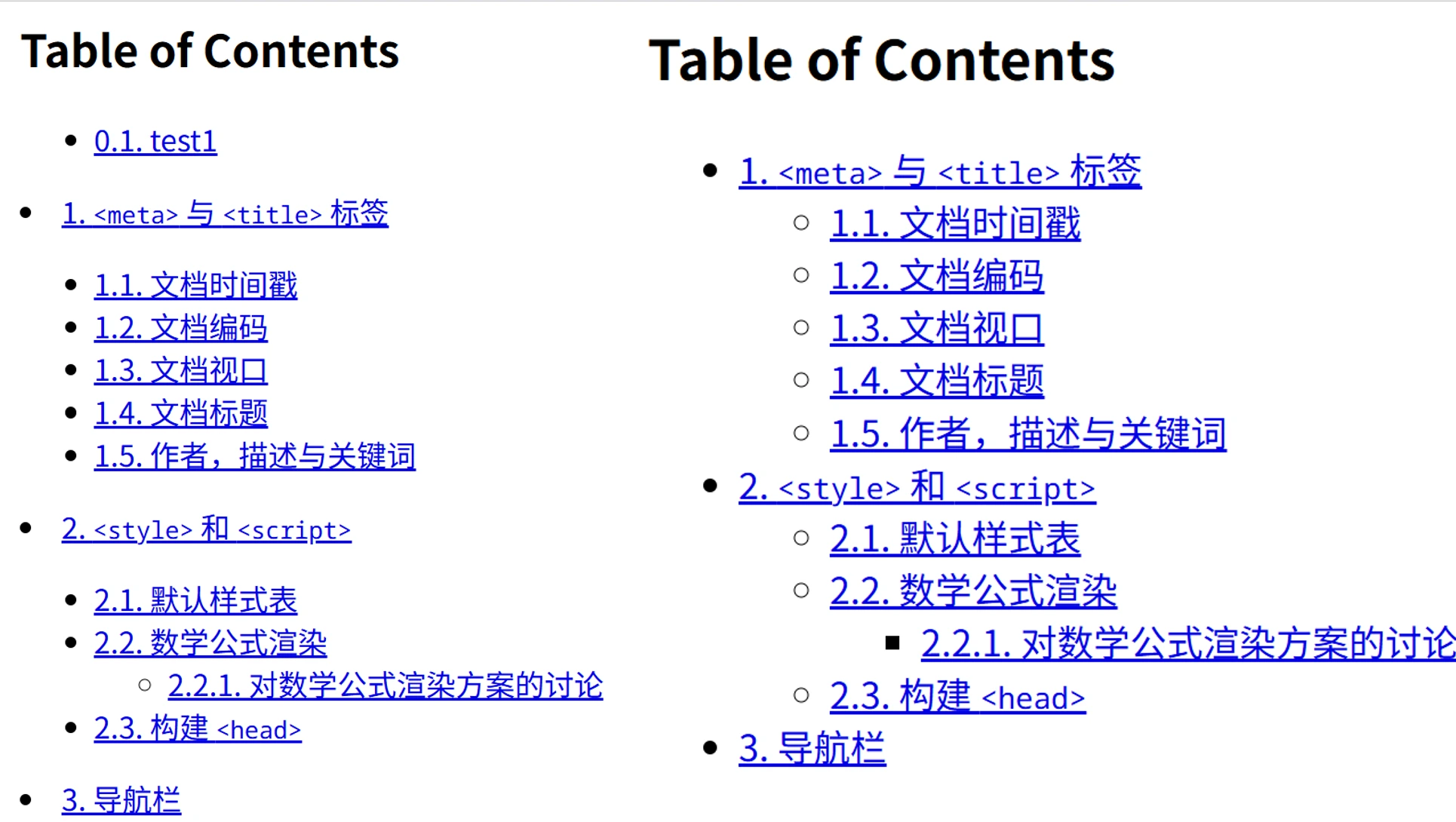
这与 org-html--toc-text 的实现有关。从原理上来说这个函数还挺简单的,但是命令式的写法确实不怎么易读:
(defun org-html--toc-text (toc-entries)
  "Return innards of a table of contents, as a string.
TOC-ENTRIES is an alist where key is an entry title, as a string,
and value is its relative level, as an integer."
  (let* ((prev-level (1- (cdar toc-entries)))
	 (start-level prev-level))
    (concat
     (mapconcat
      (lambda (entry)
	(let ((headline (car entry))
	      (level (cdr entry)))
	  (concat
	   (let* ((cnt (- level prev-level))
		  (times (if (> cnt 0) (1- cnt) (- cnt))))
	     (setq prev-level level)
	     (concat
	      (org-html--make-string
	       times (cond ((> cnt 0) "\n<ul>\n<li>")
			   ((< cnt 0) "</li>\n</ul>\n")))
	      (if (> cnt 0) "\n<ul>\n<li>" "</li>\n<li>")))
	   headline)))
      toc-entries "")
     (org-html--make-string (- prev-level start-level) "</li>\n</ul>\n"))))
这一函数的问题在于函数初始化时的逻辑缺陷,若位于 toc-entries 列表头的实体标题级别不是最高就会导致标签不平衡。这一情况在 org-export-collect-headlines 的范围不为整个文档时不会出现。
具体来说,问题出在 prev-level 的初始化上,函数通过 (let* ((prev-level (1- (cdar toc-entries))) ...) 来初始化 prev-level。这表示无论目录从哪个层级的标题开始,函数都假定存在一个比它更浅一级的父节点。对于所有的一级标题 (*),它们的“父亲”是零级标题,即文档本身;当并非一级节点位于整个文档的开头时,它没有直接的父节点,而是仅有作为祖先节点的零级标题,它的 prev-level 应为 0 而不是它本身的级别减一。
以 ** a\n* b 为例,org-html--toc-text 接收到 (("a" . 2) ("b" . 1)) 的输入时,prev-level 和 start-level 初始化为 1,在 mapconcat 的第一轮迭代中,cnt 为 (- 2 1) => 1,它会生成一个 \n<ul>\n<li>。在下一轮迭代中,cnt 为 (- 1 2) => -1,它会生成 </li>\n</ul>\n 加上 </li>\n<li>。如果初始等级差为 (- 2 0) = 2 ,第一轮迭代会生成 \n<ul>\n<li> 加上 \n<ul>\n<li> ,不会出现标签不匹配的问题。
<!-- 1 -->
<ul>
  <li></li>
</ul>
</li>
<li>
...
<!-- 2 -->
<ul>
  <li>
    <ul>
      <li></li>
    </ul>
  </li>
  <li>
  ...
为了解决这一问题,可以添加一个 top 可选参数,当参数为非空值时初始化 prev-level 为 0:
(defun t--toc-alist-to-text (toc-entries info &optional top)
  "Return innards of a table of contents, as a string.
TOC-ENTRIES is an alist where key is an entry title, as a string,
and value is its relative level, as an integer."
  (declare (ftype (function (list list &optional boolean) string))
           (important-return-value t))
  (let* ((prev-level (or (and top 0) (1- (cdar toc-entries))))
         (start-level prev-level)
         (tag (t--get-info-toc-element info))
         (open (format "\n<%s class=\"toc\">\n<li>" tag))
         (close (format "</li>\n</%s>\n" tag)))
    (concat
     (mapconcat
      (pcase-lambda (`(,headline . ,level))
        (let* ((cnt (- level prev-level))
               (times (if (> cnt 0) (1- cnt) (- cnt))))
          (setq prev-level level)
          (concat
            (t--make-string
             times (cond ((> cnt 0) open) ((< cnt 0) close)))
            (if (> cnt 0) open "</li>\n<li>")
            headline)))
      toc-entries "")
(t--make-string (- prev-level start-level) close))))从 org-html-toc 的实现来看,如果生成的是顶级目录,它总是会添加 <hN> 标题,且 N 与文档一级标题使用的级数相同。这导致的问题就是在低级标题中插入 #+TOC: headlines 时会出现这样的效果,比如:
#+title: test
#+options: html-style:nil html-preamble:nil html-postamble:nil toc:nil

* a
** b
#+TOC: headlines<div id="content" class="content">
<h1 class="title">test</h1>
<div id="outline-container-orgbaf8b75" class="outline-2">
<h2 id="orgbaf8b75"><span class="section-number-2">1.</span> a</h2>
<div class="outline-text-2" id="text-1">
</div>
<div id="outline-container-org5ca213e" class="outline-3">
<h3 id="org5ca213e"><span class="section-number-3">1.1.</span> b</h3>
<div class="outline-text-3" id="text-1-1">
<div id="table-of-contents" role="doc-toc">
<h2>Table of Contents</h2>
<div id="text-table-of-contents" role="doc-toc">
<ul>
<li><a href="#orgbaf8b75">1. a</a>
<ul>
<li><a href="#org5ca213e">1.1. b</a></li>
</ul>
</li>
</ul>
</div>
</div>
</div>
</div>
</div>
</div>我问 gemini,这段代码是不是混乱的,他给出了肯定的回答:
混乱的根源在于
<div id="table-of-contents" ...>的位置。一个文档的目录,其作用是索引整个文档的结构。因此,它在逻辑上应该位于文档的最开始,通常在主标题
<h1>之后,第一个章节<h2>之前。然而在这段代码里,目录被放置在了最深、最后一个层级。这就好比你拿到一本书,发现这本书的目录竟然印在了最后一章的最后一个自然段里。虽然目录的内容(指向第一章、第二章…)是正确的,但它的位置本身是不合逻辑的,非常混乱。
这种结构通常是因为在 Org-mode 源文件中,生成目录的命令(如 #+TOC: headlines)被错误地写在了
* a下的** b子标题里面,导致导出时目录被“困”在了那个位置。
就 ox-html 的实现方法来看,他可能希望用户仅在 Zeroth Section 中使用 #+TOC: headlines 来调整顶层目录的位置。为了“解决”这个问题,把层级交给 headline,然后让 #+TOC 仅生成目录内容似乎是一种解决方法,至于唯一的顶层目录的导出可以交给另一个函数来负责:
(defun t--build-table-of-contents (info)
  "Build top-level table of contents."
  (declare (ftype (function (list) (or null string)))
           (important-return-value t))
  (let ((fn (lambda (h) (cons (t--format-toc-headline h info)
                              (org-export-get-relative-level h info)))))
    (when-let* ((depth (t--pget info :with-toc))
                (headlines (org-export-collect-headlines info depth))
                (entries (mapcar fn headlines)))
      (concat
       "<nav id=\"toc\">\n"
       (let ((top-level (t--pget info :html-toplevel-hlevel)))
         (format "<h%d>%s</h%d>"
                 top-level "Table of Contents" top-level))
       (t--toc-alist-to-text entries info t)
       "</nav>\n"))))
该生成顶层目录的函数仅在 t-inner-template 中调用,我的 t--build-toc 实现如下(对应于 ox-html 中的 org-html-toc):
(defun t--build-toc (depth info &optional scope)
  "Build a table of contents.
DEPTH is an integer specifying the depth of the table.  INFO is
a plist used as a communication channel.  Optional argument SCOPE
is an element defining the scope of the table.  Return the table
of contents as a string, or nil if it is empty."
  (let ((fn (lambda (h) (cons (t--format-toc-headline h info)
                              (org-export-get-relative-level h info)))))
    (when-let* ((hs (org-export-collect-headlines info depth scope))
                (entries (mapcar fn hs)))
      (t--toc-alist-to-text entries info (not scope)))))
如你所见,我甚至去掉了 <nav> 标签,而仅有目录的 <ul> 部分。插入带标题的目录可以使用这样的做法,这也就是本小节标题中的「可组合」所指:#+TOC 可以和标题组合来“构建”一个完整的目录:
* Table of Contents
:PROPERTIES:
:HTML_CONTAINER: nav
:END:

#+TOC: headlinesox-html 的 TOC 还支持导出源代码块和表格的索引,这主要通过 org-html-list-of-listings 和 org-html-list-of-tables 收集并导出。我合并了它们的部分代码给出了如下实现:
(defun t--list-of-elements (collect-fn info)
  "Return an HTML list of elements collected by COLLECT-FN.

COLLECT-FN is a function that takes INFO and returns a list of Org
elements. INFO is the export state plist.

The function generates a `<ul>' list where each list item corresponds to
an element, displaying its caption. If the element has a reference
label, the item is hyperlinked to it."
  (declare (ftype (function (function list) (or null string)))
           (important-return-value t))
  (when-let* ((entries (funcall collect-fn info)))
    (concat
     "<ul class=\"index\">\n"
     (thread-first
       (lambda (entry)
         (let* ((label (t--reference entry info t))
                (caption (or (org-export-get-caption entry t)
                             (org-export-get-caption entry)))
                (title (t--trim (org-export-data caption info))))
           (format "<li>%s</li>"
                   (if (not label) title
                     (format "<a href=\"#%s\">%s</a>" label title)))))
       (mapconcat entries "\n"))
     "\n</ul>")))

(defun t--list-of-listings (info)
  "Return a formatted HTML list of source code listings."
  (declare (ftype (function (list) (or null string))))
  (t--list-of-elements #'org-export-collect-listings info))

(defun t--list-of-tables (info)
  "Return a formatted HTML list of tables."
  (declare (ftype (function (list) (or null string))))
  (t--list-of-elements #'org-export-collect-tables info))
这一部分的代码实现的比较粗糙,也许需要考虑的更加细致,或者考虑添加其他元素的索引列表,比如图片。
终于,在完成一系列子功能后,我们能够把他们拼装起来,编写 inner-template 和 template 的导出函数了。inner-template 包含目录,和文档主题内容:
(defun t-inner-template (contents info)
  "Return body of document string after HTML conversion.
CONTENTS is the transcoded contents string."
  (declare (ftype (function ((or null string) list) string))
           (important-return-value t))
  ;; See also `org-html-inner-template'.
  (concat
   t--zeroth-section-output
   (t--build-table-of-contents info)
   "<main>\n"
   contents
   "</main>\n"
   (t-footnote-section info)))
template 包含 HTML <head>, navbar, pre/postamble 等内容:
(defun t--build-title (info)
"Build the HTML for the document title and subtitle.
This function generates the `<h1>' title and an associated
paragraph for the subtitle. It only produces output if
:with-title is non-nil in the INFO plist."
(declare (ftype (function (list) string))
(important-return-value t))
(when (plist-get info :with-title)
(let ((title (plist-get info :title))
(subtitle (plist-get info :subtitle)))
(concat
"<h1 id=\"title\">"
(let ((tit (org-export-data title info)))
(or (t--nw-p tit) "‎"))
"</h1>\n"
;; FIXME: Consider use subtitle, not w3c-state
(let ((sub (org-export-data subtitle info)))
(format "<p id=\"w3c-state\">%s</p>\n" sub))))))
(defun t-template-1 (contents info)
"Assemble the full HTML document structure around CONTENTS.
This function generates the complete HTML page, including the `<html>',
`<head>', and `<body>' tags. It orchestrates the inclusion of the
navbar, title, preamble, postamble, and other standard page elements."
(declare (ftype (function (string list) string))
(important-return-value t))
(concat
"<!DOCTYPE html>\n"
(format "<html lang=\"%s\">\n" (plist-get info :language))
(t--build-head info)
"<body>\n"
;; home and up links
(when-let* ((fun (plist-get info :html-format-navbar-function)))
(funcall fun info))
;; title and preamble
(format "<div class=\"head\">\n%s%s</div>\n"
(t--build-title info)
(t--build-pre/postamble 'preamble info))
contents
;; back-to-top
(when (plist-get info :html-back-to-top)
t-back-to-top-arrow)
;; Postamble.
(t--build-pre/postamble 'postamble info)
;; fixup.js here
(t--nw-p (plist-get info :html-fixup-js))
;; Closing document.
"</body>\n</html>"))
(defun t-template (contents info)
"Return complete document string after HTML conversion.
CONTENTS is the transcoded contents string. INFO is a plist
holding export options."
(declare (ftype (function (string list) string))
(important-return-value t))
(prog1 (t-template-1 contents info)
(t--oinfo-cleanup)))你可能会注意到还包含了其他一些东西,一级 t--oinfo-cleanup 是什么玩意。这些应该会在后续的博客中介绍。
在完成 inner-template 和 template 的重构后,整个重构工作也算是完成一小部分了。不过在开始后续部分的重构之前,也许我需要就以下两个方面先“夯实”一下现有的代码:
- 文档字符串。目前我为函数编写的 docstring 没有一个统一的标准,需要了解官方文档中的建议,以及让大模型为我修改 docstring。
- 单元测试。目前代码文件的大小是接近 190KB,测试文件接近 110KB,差不多是代码文件的一半。虽然测试量不小了,但是大部分代码并不是按照单元测试的最佳实践来编写的,我需要首先学习如何编写好用的单元测试,然后让大语言模型帮我重构测试代码。
上面这两部分足够我再水两篇博客了,剩下部分的重构先“搁置”一段时间(改文档和测试好像也是重构)。在接下来的 special-block 和 link 重构中,也许我首先需要学习 org-special-block-extras 和 org-extra-emphasis。
感谢阅读。